
How to Easily and Quickly Transfer Money from PayPal to Your Bank
Table of Contents
- How to Transfer Money from PayPal to a Bank Account?
- How to Link an Eligible Debit Card or Bank Account with PayPal?
- How to Transfer Money from PayPal to a Bank Account Using the Website?
- How to Transfer from PayPal to a Bank Account Using the Mobile App?
- How Long Does It Usually Take for PayPal to Transfer Money to the Bank?
- Why Can't I Transfer Money from PayPal to My Bank Account?
- Your PayPal account is not verified
- Your bank account or debit card may not be eligible for a quick transfer
- The information you provided when trying to connect your bank account does not match the information your bank has on file
- There is a limit on your PayPal account
- Your funds may be placed on hold
- Are there any Withdrawal Limits when Moving Money from PayPal to a Bank Account?
- What are the fees to transfer money from PayPal to a bank account?
- PayPal Withdrawal Fee
- Electronic Funds Transfer (EFT) Fee
- Currency Conversion Fee
- Fees for Cards and Checks
- Conclusion
PayPal is so popular that you probably already use PayPal to make online purchases. But what happens when you need to transfer money from PayPal to your bank account? It can be a bit confusing if you have never done it before.
In this article, we will show you how to transfer money easily and quickly from PayPal to your bank account.

How to Transfer Money from PayPal to a Bank Account?
Transferring funds from a PayPal account to a bank account can be done in a few ways. You can do this via their mobile app or website.
But before you can move money out of PayPal, you must link your bank account with it. We describe how to do so in the section below.
You must link your bank account with PayPal if you want to send money to that account.
How to Link an Eligible Debit Card or Bank Account with PayPal?
Before you can transfer money from your PayPal account to your bank account, you will need to link1 an eligible debit or credit card, and/or a bank account to your PayPal account. The directions are slightly different on the website vs the app.
On the website:
- Login into your PayPal account.
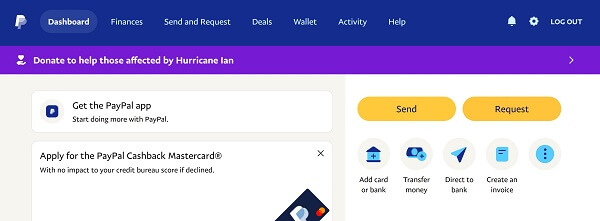
- On your Dashboard, click on "Add card or bank" link on the right-side panel. Alternatively, you can choose the "Wallet" link from the top navigation, and then click on the "Link a card or bank" button on the top left.
- On the next screen, choose the type of card or account you want to link – options will vary from country to country, but should generally have at least debit card, credit card and bank account available at a minimum. Based on what you want to link, choose "Link a debit or credit card" or "Link a bank account".
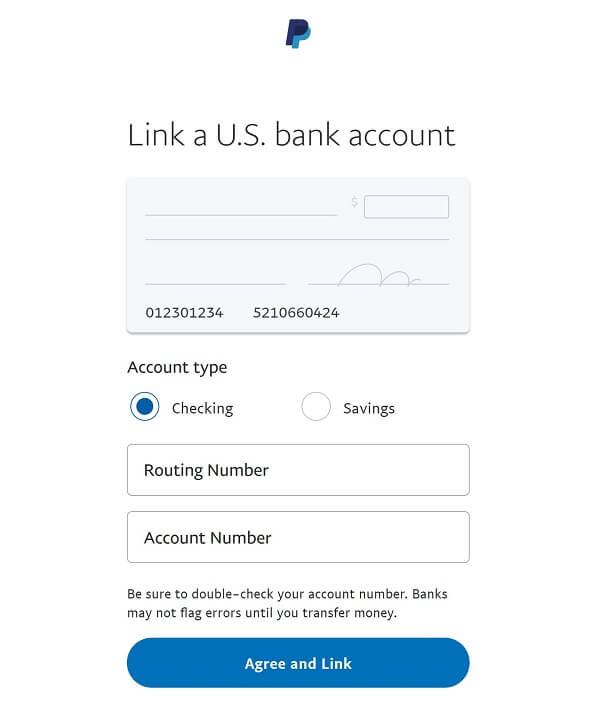
- Based on your chosen option, enter the needed information. For bank accounts, you can either choose your bank and login to automatically link it, or enter your bank information manually. If you choose to enter your bank details by hand, the form should look like the below.
- Enter your information, confirm, and click "Agree and Link".

On the app:
- Tap on Wallet on the bottom navigation bar.
- Tap on "Add Banks and Cards" then choose Banks or Debit and Credit Cards.
- Enter your information, confirm, and click "Agree and Add".
Note: You must have a verified bank account to make electronic funds transfers.
It's quick and simple to withdraw your PayPal balance once your bank account has been linked to your PayPal account. See the below sections on the steps to accomplish this using both the PayPal website as well as mobile app.
If you do not have a PayPal account yet, you can easily create one and start moving money seamlessly between PayPal and your bank account.
How to Transfer Money from PayPal to a Bank Account Using the Website?
You can easily transfer2 your PayPal balance to your linked bank account following these steps:
- Step 1. Sign in into PayPal: Go to paypal.com and log in to your account.
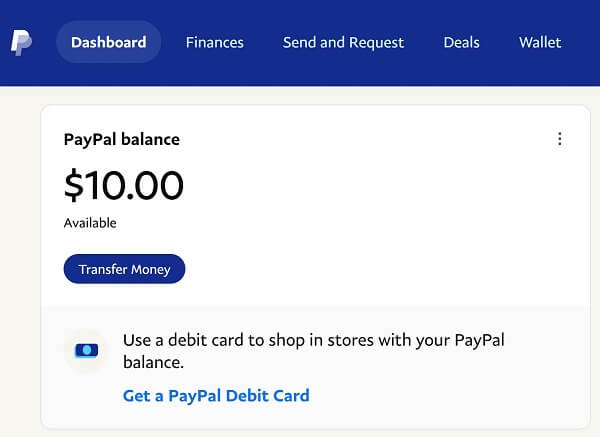
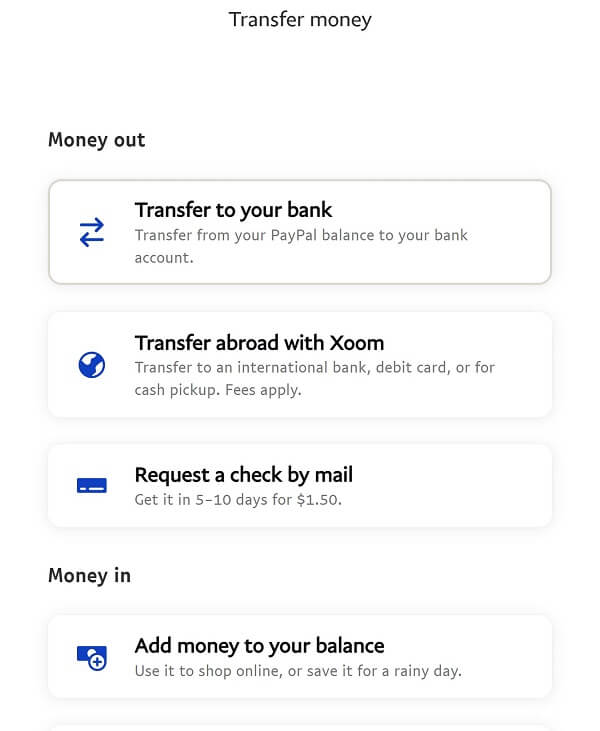
- Step 2. Choose Transfer Money option: On the top left of the page, you will see your PayPal balance, and below that "Transfer Money". You can also access the "Transfer money" link from the Dashboard right side navigation. Alternatively, you can click on the "Wallet" link in the top navigation, and then choose "Transfer Money" option under your PayPal balance amount.
- Step 3. Choose Transfer to your bank option: On the next screen, you will see options to move money in and out of PayPal. Under the "Money out" section, choose the "Transfer to your bank" option.
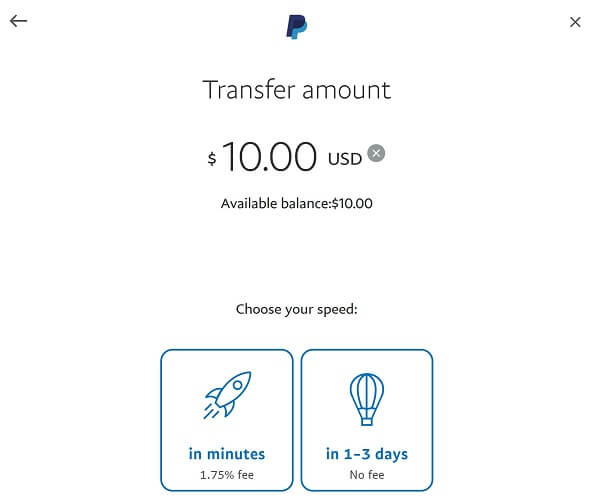
- Step 4. Enter transfer amount and choose transfer speed: Enter the amount you want to transfer to your bank account. Then select the transfer speed.
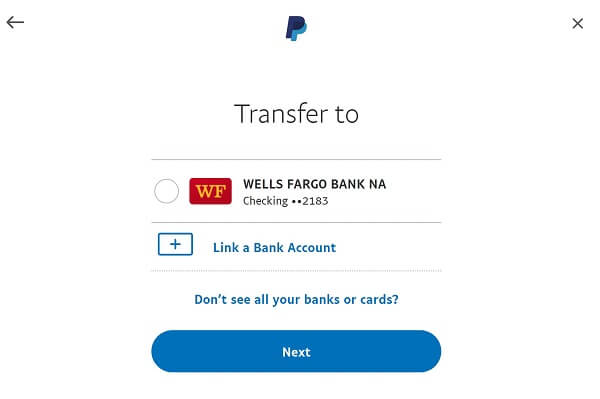
You have 2 options here – transfer within minutes and transfer in 1-3 business days. If you choose the faster option of transfer within minutes, you will have to pay a 1.75% transfer fee. If you do not want to pay the fee, choose the 1-3 business days transfer option. - Step 5. Choose target bank account: Now, choose the bank account you want to transfer money to. Your linked bank accounts will show up here. Alternatively, you can link a new bank account (follow the instructions as per the prior section in this article to do so). Once you choose your desired bank account, click "Next".
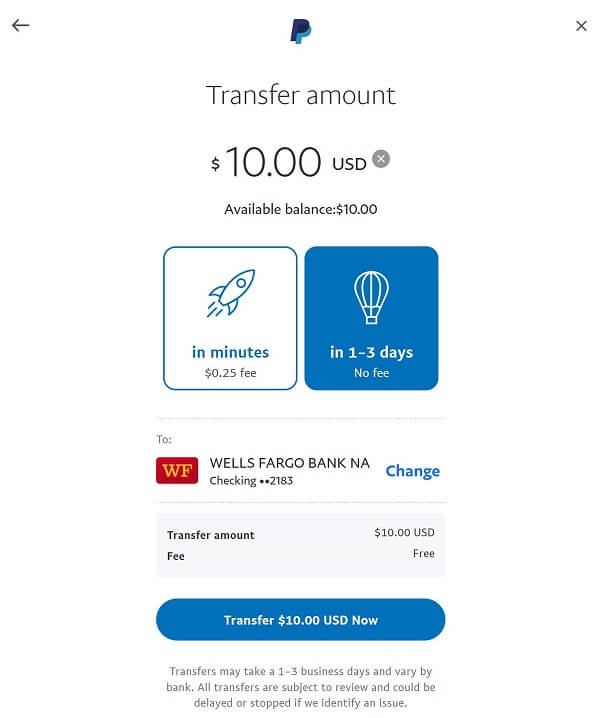
- Step 6. Review your money transfer: In the next screen, review your money transfer request to ensure everything looks OK. Once you are satisfied, confirm your transfer.
- Step 7. See transfer complete confirmation: You will see a confirmation screen after your transaction has been accepted by PayPal. From this point on, PayPal will work on completing the transfer based on the transfer speed you chose, and the funds should arrive in your bank account in the expected timeframe.
- Step 8. Receive email notification: You will also receive an email notification from PayPal confirming that your transfer request is in progress. The email will have information about the transfer amount as well as the expected time of arrival of the funds into your bank account.

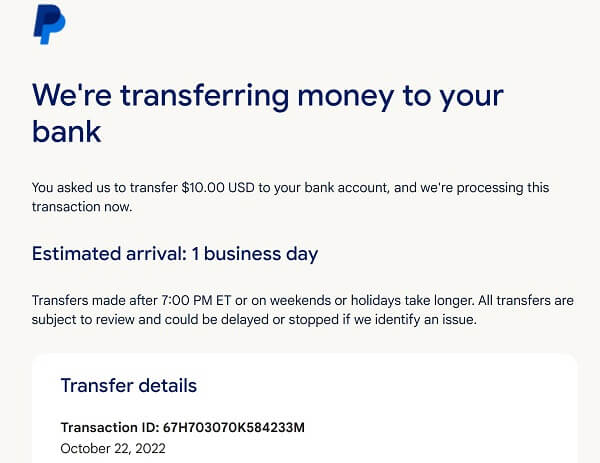
It is quick and easy to start a money transfer from your PayPal account to your bank account.
At this point, sit back and relax. PayPal will work on moving your money from your PayPal account to your bank account, and the money should be in your bank account within the timeframe you chose when you submitted the transfer request.
How to Transfer from PayPal to a Bank Account Using the Mobile App?
Using the PayPal app, you can easily transfer money from your PayPal account to your bank account with just a few taps. Here is how:
- Step 1: Download the PayPal mobile app and login into your account.
- Step 2: On the home page, next to your balance, tap on "Transfer to your bank".
- Step 3: Choose the bank you want to send the money to and click "Next".
- Step 4: Enter the desired amount you want to transfer and click "Next".
- Step 5: Check the transfer details and once ready, click "Transfer Now".
If you do not have a PayPal account yet, create one is quick and easy to do. Once you have your PayPal account setup, you can start transferring funds easily between PayPal and your bank account.
How Long Does It Usually Take for PayPal to Transfer Money to the Bank?
If you are waiting on a PayPal transfer to hit your bank account, you may be wondering how long it will take. The good news is that in most cases, the money will arrive within a few days. But there are some factors that can influence the timeline.
Here is what you need to know about how long PayPal transfers usually take3.
PayPal typically takes between 3 to 5 business days to process a withdrawal from your PayPal balance to your bank account. It can take longer if you transfer money on a holiday.
All transfers are subject to review, and there are some cases where PayPal may place a hold on your withdrawal. This can happen if you have recently opened a new PayPal account or if you have had a lot of activity in your account. If this happens, it can take up to 21 days for the funds to become available in your bank account. However, PayPal will always let you know if there are any challenges with your transfer.
It usually takes between 3-5 business days for PayPal to bank account transfers to complete.
In most cases, you will not need to worry about how long it will take for your PayPal transfer to hit your bank account. The funds generally arrive within 3-5 business days. And if you have any questions, you can always check the status of the transaction in your PayPal account history.
Why Can't I Transfer Money from PayPal to My Bank Account?
You have been using PayPal for a while now and it's been working great. You have even started using it to receive payments from clients. But there is one thing you cannot figure out: Why can't you transfer money4 from your PayPal account to your bank account?
There are a few reasons you may not be able to transfer money from your PayPal account to your bank. Let us review why you might not be able to transfer money from your PayPal account to your bank account and what you can do about it.
Your PayPal account is not verified
To verify your PayPal account, you will need to link it to a bank account or credit card. Once you have done that, you should be able to transfer money from your PayPal account to your bank account without any problems.
Your bank account or debit card may not be eligible for a quick transfer
PayPal's instant transfer is a great way to get your money out of PayPal and into your bank account instantly. However, not all bank accounts are eligible for this service.
If your bank account or debit card is not eligible for PayPal's instant transfer, you will need to change to one that is to take advantage of this service (or use the standard transfer option).
The information you provided when trying to connect your bank account does not match the information your bank has on file
Make sure you have the correct bank account numbers. If your current information is incorrect, edit it and reconnect your bank account.
There is a limit on your PayPal account
Authentication restrictions and account limitations can prevent you from doing things like withdrawing, sending, or receiving money, and are examples of some limits that your PayPal account can be subject to.
When PayPal detects suspicious activity on your account, these limitations may be put in place. This is done to protect buyers and sellers by limiting people's abilities within their accounts. Limitations also help PayPal in gathering the data it requires to keep your account active.
Your funds may be placed on hold
If you are new to PayPal, you may not know that there is a slight delay between when you make a sale and when the money arrives in your account. This is because PayPal puts a hold on funds to make sure that the buyer has enough money to cover the transaction. Once the hold is released, the funds will appear in your account.
There are a few factors that can affect how long a hold lasts, but typically it takes no more than 21 days for the hold to be released. If you're selling digital goods or services, though, your holds should only last for about 30 minutes.
While it may be frustrating to wait for your money, PayPal does this to protect buyers and sellers from fraud.
There may be a few reasons why you may not be able to transfer money from your PayPal account to your bank account.
Are there any Withdrawal Limits when Moving Money from PayPal to a Bank Account?
When you transfer money from PayPal to your bank account, there are some limits5 in place that you should be aware of.
The good news is that PayPal withdrawal limit for sending money to your bank account is pretty high. You can move up to USD 25,000 per transaction when you choose to transfer funds from your PayPal account to your linked bank account.
Of course, your wallet balance should have enough funds to be able to send money out. But so long as you have enough money in your PayPal wallet, you can send up to USD 25,000 per transaction.
If you choose to transfer money from PayPal to a linked debit or credit card, the withdrawal limits are as below:
- USD 5,000 per transaction or day or week – whichever limit is reached first will apply
- USD 15,000 per month
You can transfer USD 25,000 per transaction from PayPal to a bank account, and up to USD 15,000 per month to a debit or credit card.
What are the fees to transfer money from PayPal to a bank account?
In some cases, there are fees applicable for transferring money from your PayPal account to your bank account. Below, we cover various scenarios that trigger PayPal withdrawal fees, and list what those fees are.
PayPal Withdrawal Fee
The good news is that if you do a transfer of funds from PayPal to your linked bank account, there is no fee involved as long as both your PayPal account and your bank account are in the same currency. If there is currency conversion involved, then additional fees will apply – more on this later.
If you choose to do an Instant withdrawal from PayPal, you will have to pay a fee of 1.5% of the transfer amount.
However, there are minimum and maximum limits to this fee5, and currently they are USD 0.25 and USD 15, respectively. In other words, you will pay a maximum fee of USD 15 for instant transfers to a bank account.
If you transfer money from PayPal to a bank account, there is no fee. Instant transfers get charged at 1.5% subject to min/max of USD 0.25 and USD 15.
Electronic Funds Transfer (EFT) Fee
Some banks may charge an EFT fee for incoming transfers. Note that this is not a PayPal fee; check with your bank to see if you will be charged an EFT fee for transferring money into your bank account from PayPal.
Currency Conversion Fee
If your PayPal balance is in a different currency from the one your bank account has, you will also incur additional charges for currency conversion.
If you send international payments6 from your PayPal account that involve currency exchange, you will have to pay a 5% fee, subject to a minimum fee of USD 0.99 and a maximum fee of USD 4.99.
The other very important aspect to be aware of is the foreign exchange rate (also called currency exchange rate) that PayPal will apply to convert the foreign currency into your local currency.
PayPal's FX Markup is around 3-4% on top of the mid-market exchange rate. This is pretty high and will certainly reduce your payout in your local currency.
PayPal can be an expensive way to send money overseas given its high transfer fees and low exchange rates.
To avoid paying high PayPal fees and FX Markup and save money when you transact with international currencies, consider using money transfer specialists instead. You can rely on a money transfer comparison engine like RemitFinder to search and compare the best money transfer companies for dealing with multiple currencies.
Want to explore by country? Browse all destination countries on our send money to hub or sending countries on our send money from hub.
Fees for Cards and Checks
In case you transfer money from PayPal to a debit card, credit card or just get a paper check mailed to you, there are fees that apply as below:
- Debit and Credit card instant withdrawals get charged a 1.5% fee, subject to USD 0.25 and USD 15 minimum and maximum fee, respectively.
- Paper checks get charged a flat fee of USD 1.50.
Be aware of various fees that may apply when you move money from your PayPal account to your linked bank account or card.
Conclusion
Moving your money from your PayPal account to your bank account is a great way to access your earnings outside of PayPal. With the knowledge above, you are now hopefully better equipped to seamlessly transfer funds from PayPal to your linked bank account or debit and credit cards.
Be watchful of transfer fees and transaction limits to ensure that you can minimize the impact of fees to your final payout. Finally, if currency conversion is involved, you may want to look at alternatives that are much cheaper and provide better exchange rates.
References:
1. PayPal's help article on how to link your bank account with PayPal
2. PayPal's guide on how to transfer money out of your PayPal account
3. PayPal's guide on how long it takes to transfer money to a bank account
4. Reason why you cannot transfer money from PayPal to a bank account
5. PayPal's withdrawal limits in fee changes notice - Pages 7, 8
6. PayPal's international transaction fees in fee changes notice - Pages 5, 6
Categories


Similar Articles

What Is PayID And How Does It Work?
Learn how PayID simplifies payments in Australia. Discover how it works, its benefits, and how to send and receive money without bank details.

Complete Guide To Cash App Limits
Learn about Cash App limits for sending, receiving, and withdrawals. Understand how they work and how to maximize your account usage.
Complete Guide To Cash App Fees And Charges
Understand Cash App fees and charges, from transaction costs to hidden fees. Learn how to avoid extra charges and get the most out of your account.