
Fast and Easy: How to Send Money through PayPal
Table of Contents
- How Does PayPal Work?
- What Types of Payments can You Make with PayPal?
- Personal Transactions - Sending Money to Friends and Family Using PayPal
- Commercial Transactions - Sending Money through PayPal for Products and Services
- How to Send Money through PayPal?
- How much does it Cost to Send Money using PayPal?
- How much Money can I send using PayPal?
- Conclusion
These days, it seems as if everyone is always on the go. We do not have time to waste when it comes to getting things done. This is especially relevant for our financial life. No one wants to stand in lines and make and receive payments with paper checks and cash.
Therefore, PayPal has become such a popular choice for sending and receiving money. PayPal is fast, easy, and convenient, and helps you send money to others seamlessly.
In this article, we will walk you through the process of sending money through PayPal so you can get started and make sure of PayPal payments to pay others.
But first, let us see how PayPal works.
How Does PayPal Work?
PayPal has become so popular in the last few years that you probably already use it, or at least have heard of it. It is a handy financial tool that allows you to send and receive money without having to carry around cash or use cards. But how does it work? Let us take a deeper look.
When you sign up for a PayPal account, you will need to provide some basic information like your name, address, and email address. You will also need to create a password. Once you have done that, you can link your bank account, debit card or credit card to your PayPal account to easily transfer money in and out.
To send money through PayPal, all you need is the email address of the person to whom you are sending the funds. The recipient will then get an email notification letting them know that they have been sent money. They can then log in to their PayPal account and claim the money.
PayPal makes it simple and easy to send and receive payments.
It is really that simple! Next time you need to send someone money, whether it is for goods or services, why not give PayPal a try? You might be surprised at how easy and convenient it is.
Next, we will look at what types of payments you can make with PayPal.
What Types of Payments can You Make with PayPal?
When sending money with PayPal, you have the option to either send to family and friends, or to pay for goods and services provided by suppliers, merchants and companies.
Each of these two payment types gets a vastly different treatment in the PayPal ecosystem, so it is important to understand the differences between them. This way, you can choose the right payment type for your next PayPal money transfer.
Personal Transactions - Sending Money to Friends and Family Using PayPal
One of the great things about PayPal is that you can use it to send money to friends and family. This can be helpful if you need to split a bill or pay someone back for something.
PayPal categorizes such transfers as Personal Transactions, and they are generally free of cost. We discuss fees in more detail in a subsequent section; make sure to check that for scenarios where you may still have to pay a fee for personal transfers.
It is straight forward to send money to someone (we will provide detailed instructions in a following section), and you can either use your computer or a mobile device to finish your transfer.
Just be sure to choose the option to send money to friends and family rather than goods and services. Money transfers sent to family and friends are totally free as long as you use either your PayPal wallet balance to make the payment, or use your linked bank account to do so.
When you complete the transaction, the funds will immediately be sent and show up in the recipient's PayPal account. After that, they are free to spend it as they like, including sending it to a friend or family member, making purchases using their PayPal account, or withdrawing it to their bank account.
Another important point to be aware of with Personal Payments sent via PayPal is that they can only be sent to Personal PayPal accounts. You cannot send personal payments to PayPal business accounts.
Personal transactions done with PayPal are generally free, and payments can only be sent to PayPal personal accounts.
Commercial Transactions - Sending Money through PayPal for Products and Services
If you are sending money for goods or services you consumer from a merchant or supplier, you can use PayPal to pay them. Note that any payments made for goods or services are considered Commercial Transactions within the PayPal system.
The recipient will need to have or sign up for a PayPal account to receive the money. The process works the same way as sending to a friend or family member. There is an additional option to scan a QR code if the vendor has one. You will see that to the right of the name field on the app.
The biggest difference in paying for products and services vs paying a friend with PayPal is that PayPal will take a percentage of the transaction for payments made to companies, merchants, and suppliers. Therefore, your recipient will not receive the full amount you originally sent them.
PayPal will charge the recipient a percentage of the payment if it is a commercial transaction.
When sending money to pay for goods and services, be sure to choose that option, rather than paying friends. The fee that PayPal charges will come out of the vendor's account and is considered part and parcel of doing business.
How to Send Money through PayPal?
PayPal is one of the easiest ways to send money. All you need is the recipient's email address, and you can send them money from your PayPal balance, bank account, or credit card. You can also use PayPal to request money.
Here is how to send money through PayPal step by step with both their website as well as the mobile app.
Sending money using a computer via the PayPal website
You may use any internet browser on your computer to send money with PayPal. Follow the below steps to complete your money transfer.
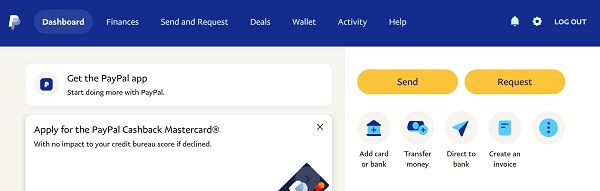
- Step 1. Sign in into PayPal and choose to send money: Log in to your PayPal account and click "Send and Request" in the quick links at the top of the page. Alternatively, you can also choose the "Send" option from the right-side links on your dashboard. Both options will take you to the send money part of the site and look as below.
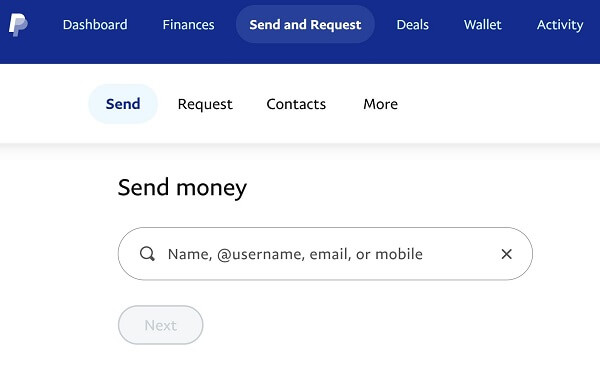
- Step 2. Choose or create your recipient: Once you click on the Send option, you will be taken to a form to start the send money process by choosing a recipient. If you have preexisting contacts, you can pick them here, or you have the option to look up a new contact.
- Step 3. Enter recipient information: Enter the recipient's PayPal username, their name, phone number or email address. Before transferring money, make sure you have the recipient's correct phone number or email address to avoid sending it to the wrong person by accident.
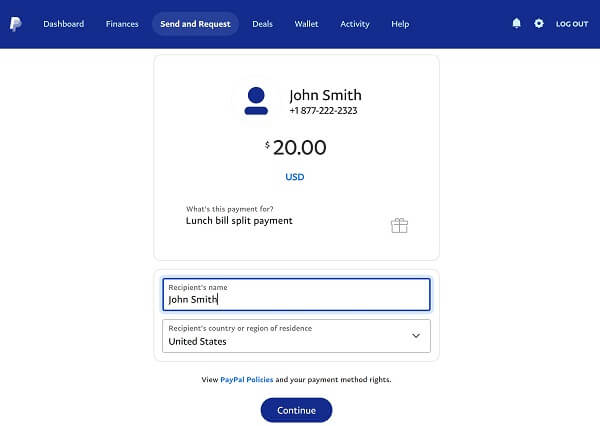
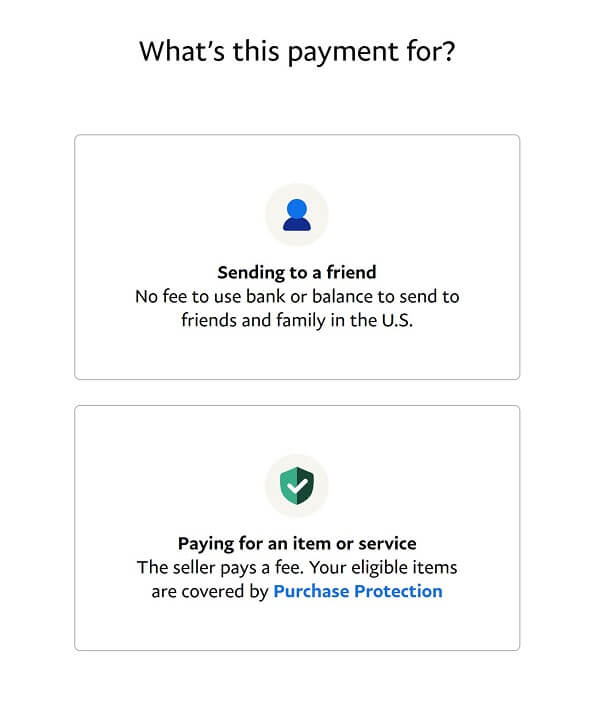
Next, enter the recipient's name and the purpose of your transaction. You can also choose their country. By default, it is set to the same country as yours. Below is an example of sending to someone using their phone number. Once done, click on "Continue". - Step 4. Choose the reason for your transfer: Now you will be asked to choose the reason for your payment. The possible options are:
- Sending to a friend – in this case, there is no fee incurred as long as you use your PayPal wallet or a bank account to pay, and the transfer is domestic
- Paying for an item or service – in this case, the seller will have to pay a fee on the amount you send to them
- Step 5. Confirm your payment: Once you choose the reason for your payment, you will be taken to a confirmation screen. Make sure everything looks OK, and click on the "Send Payment Now" button. The recipient will be instantly notified of your payment.
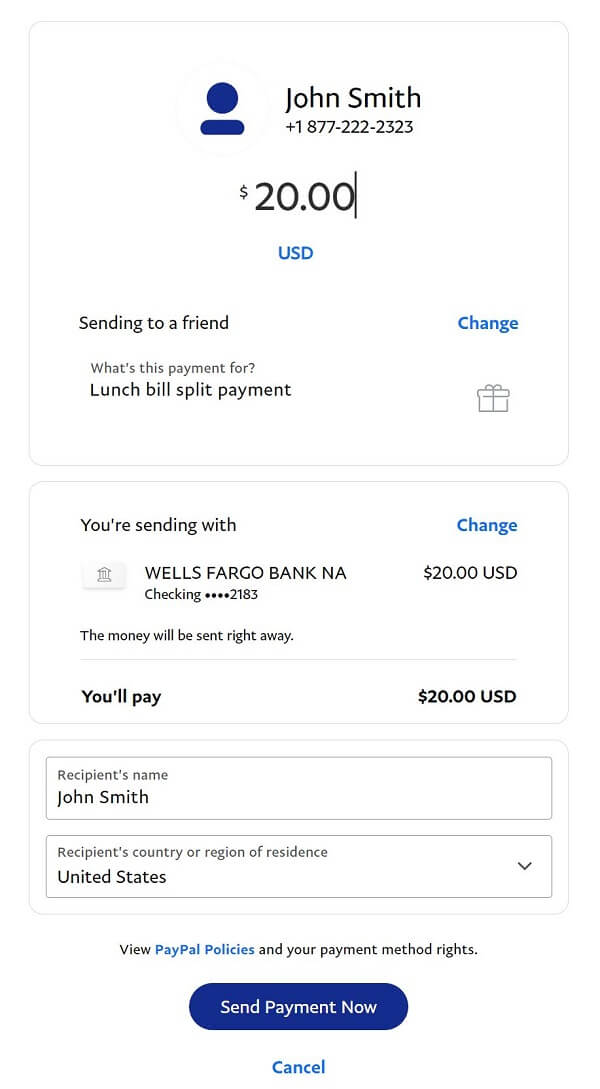
At this point, you are pretty much done. PayPal will work on moving your money to the recipient, and both you and them will be notified as the transfer progresses forward.
It is quick and easy to send money to someone from your PayPal account.
Sending money via the PayPal app
The PayPal mobile app is a fast and easy way to send money on the go. The app is available on the Apple App Store and Google Play. To send money through the PayPal app, follow these steps:
- Step 1: Open the application on your device and tap "Send" at the bottom of the page.
- Step 2: Enter the name, PayPal username, email address, or mobile number of the recipient.
- Step 3: Choose the amount of money you want to send and in what currency, as well as an optional message about what the payment is for. Tap "Next."
- Step 4: Choose the account, card, or PayPal balance from which you would like to transfer the money.
- Step 5: Review the information and tap "Send". Your recipient will be notified that the money you sent them is on the way.
How much does it Cost to Send Money using PayPal?
For many transaction types, PayPal is free. Opening a PayPal account is free, and there are no additional fees for purchasing goods or services.
When it comes to sending money with PayPal, the fees1 vary significantly based on if the transfer is domestic or international.
For domestic transfers done with PayPal, depending on how you fund your transfer, the following fees apply:
- Personal payments to anyone within the same country and currency are free if you pay with your PayPal wallet balance or with a linked bank account.
- If you pay with a debit card or a credit card, you will have to pay a fee that includes 2.90% of the transfer amount as well as a fixed fee2. For example, the fixed fee is USD 0.30 for US transfers, and GBP 0.20 for UK transfers.
- If you pay using your Amex Send account, you do not have to pay any fee.
Personal, domestic PayPal payments are free if paid with your PayPal wallet or a linked bank account. Card payments cost 2.9% plus a fixed fee that varies by countries.
If currency conversion3 is necessary for your transaction, your transfer is considered international in nature. In such cases, the following PayPal fees apply:
- For transfers done with money in your PayPal wallet balance or funded via your linked bank account, the fee is 5% of the transfer amount with a minimum fee of USD 0.99 and a maximum of USD 4.99.
- If the payment is done via a debit or credit card, the fee is the same as above i.e., 5% with USD 0.99 minimum and USD 4.99 maximum. Note that your credit card company may also charge you an additional cash advance fee.
- If you pay with your Amex Send account, the fee is also the same as noted above.
International transfers with PayPal cost 5% of the transfer amount with min/max limits of USD 0.99 and USD 4.99.
Additionally, when currency conversion is needed, PayPal will use a retail exchange rate (the wholesale cost of foreign currency as denominated by an outside financial institution) in addition to a conversion service fee. This is usually a 3-4% FX Markup over the mid-market or interbank exchange rate; the exact number will be disclosed at transaction time.
As you can see, the fees quickly stack up if you send international payments with PayPal.
For example, if you send USD 1000 from US to a family member in the UK, you will pay the minimum transfer fee of USD 4.99 plus a hidden fee as part of a 3-4% marked up exchange rate on your US to UK money transfer transaction.
PayPal can be expensive to send money overseas due to high fees and lower exchange rates.
To avoid losing so much money to fees and hidden charges that come with an inferior exchange rate, consider using money transfer specialists that can move your money quickly overseas with much lower fees and higher exchange rates.
You can also rely on RemitFinder's online money transfer comparison engine to take the hassle out of your international money transfers. Give it a try, and see how many good choices exist to help you move money from one country to another.
How much Money can I send using PayPal?
When it comes to sending money using PayPal, there are some limits4 in place that you should be aware of.
The good news is that there are no PayPal money transfer limits if your account is fully verified. Also, you can generally send up to USD 60,000 in a single transaction.
In some cases, this may be limited to USD 10,000. Additionally, the sending limit varies by currency, so make sure to check your limit before you send money with PayPal.
Fully verified PayPal account holders can send up to USD 60,000 per transaction.
Checking your sending limit is very easy. Simply login into your PayPal account, go to the My Account section and click on View Limits next to your wallet balance. You can also request to increase the limit by clicking on Lift Limits; simply follow the requisite process and provide the necessary documentation.
Conclusion
Sending money with PayPal is quick, easy and hassle free, especially if you send domestically. International transfers can get expensive due to PayPal's fees and relatively higher FX Markup, so make sure to do your due diligence.
Also, be aware of fees and sending limits as you plan your money transfer using PayPal. You can also check various alternatives like money transfer specialists to send money overseas.
References:
1. Guide to PayPal's fees
2. List of PayPal's fixed fees for various countries
3. Guide to PayPal's currency conversion process and fees
4. Guide to PayPal's money transfer sending limits
Categories


Similar Articles

What Is PayID And How Does It Work?
Learn how PayID simplifies payments in Australia. Discover how it works, its benefits, and how to send and receive money without bank details.
Complete Guide To Cash App Limits
Learn about Cash App limits for sending, receiving, and withdrawals. Understand how they work and how to maximize your account usage.
Complete Guide To Cash App Fees And Charges
Understand Cash App fees and charges, from transaction costs to hidden fees. Learn how to avoid extra charges and get the most out of your account.