
PayPal Business Account - All You Need To Know
Table of Contents
- Features And Benefits Of PayPal Business Account
- How To Set Up A PayPal Business Account
- Understanding PayPal Business Account Fees
- Domestic Payment Receipt Fees
- International Transaction Fees
- Micropayments Fees
- Chargeback Fees
- Currency Conversion Fees
- Withdrawal Fees
- PayPal Business Account Security
- Tips For Optimizing Your PayPal Business Account
- Comparing PayPal Business Account With Other Payment Solutions
- Conclusion: Is A PayPal Business Account Right For You?
PayPal is a digital payment system that has revolutionized online transactions. It provides a quick, safe and easy way to transfer money without needing physical cash or credit card payments.
A PayPal Business Account is designed for businesses that operate online and need a payment solution that is flexible, secure and reliable. With a PayPal Business Account, companies can receive and send payments, invoice customers, and manage their finances all in one place.
This account type is ideal for businesses that conduct transactions globally as PayPal supports payments in over 100 currencies, making it a convenient payment solution for international transactions. Additionally, it provides a layer of security for businesses that need to keep their financial information safe.
In this article, we delve into the features and benefits of a PayPal Business Account, how to set one up, associated fees, security measures and how to integrate it with e-commerce platforms. We also provide tips on optimizing your PayPal Business Account and compare it with other payment solutions.
Features And Benefits Of PayPal Business Account
PayPal Business Account offers several useful features and offer many benefits to businesses that need to receive payments and manage their finances.
Here are some of the key features and benefits of a PayPal Business Account:
- Payment Processing: PayPal Business Account allows businesses to receive payments from customers using their PayPal balance, credit card, debit card or bank account. This means that companies can accept payments from anyone, anywhere in the world, without needing a physical card terminal.
- Invoice Creation: PayPal Business Account also enables businesses to create and send invoices to customers quickly and easily. Businesses can customize their invoices with their branding, product or service descriptions and payment details, making it easier for customers to pay them.
- Multiple User Access: PayPal Business Account offers multiple user access, allowing businesses to add team members or accountants to help manage their finances. This feature allows businesses to delegate responsibilities and keep track of who is accessing their account.
- Multi-Currency Support: PayPal Business Account supports payments in over 100 currencies, making it a convenient payment solution for businesses that conduct transactions globally. Additionally, PayPal offers currency conversion services, eliminating the need for businesses to use a third-party currency exchange service.
- Fraud Protection: PayPal Business Account offers fraud protection and Seller Protection policies that help protect businesses from fraudulent transactions and chargebacks. PayPal has a team of experts that monitor transactions for suspicious activity and help resolve disputes if they arise.
- Reporting And Analytics: PayPal Business Account offers reporting and analytics tools that allow businesses to track their sales, revenue and expenses. This information can help businesses make data-driven decisions and optimize their financial performance.
- Mobile App: PayPal Business Account also comes with a mobile app that allows businesses to manage their finances on the go. The app provides access to account balances, transaction history, and reporting and analytics tools, making it easier for businesses to stay on top of their finances.
From receiving payments using multiple payment methods to invoicing to multi-current support, PayPal Business Account offers several useful features for businesses.
How To Set Up A PayPal Business Account
Setting up a PayPal Business Account is a straightforward process that can be completed in a few easy steps.
Here is a step-by-step guide on how to set up a PayPal Business Account:
- Step 1: Go To The PayPal Website: Visit the PayPal website and click on the "Sign Up" button in the top right corner of the page.
- Step 2: Choose Account Type: On the next page, select the "Business Account" option, and click on the "Get Started" button.
- Step 3: Provide Business Information: You will be prompted to provide information about your business, such as the business name, email address, and password. You will also need to provide your business address and phone number.
- Step 4: Add Business Details: You will be asked to provide more information about your business, such as the industry, business type, and average transaction value.
- Step 5: Link Bank Account: You will need to link your business bank account to your PayPal account. This will allow you to withdraw funds from your PayPal account into your bank account.
- Step 6: Confirm Email Address: PayPal will send a confirmation email to the email address you provided during registration. Follow the instructions in the email to confirm your email address.
- Step 7: Verify Identity: To verify your identity, PayPal may ask you to provide additional information, such as a Social Security number, Employer Identification Number (EIN), or other identification documents.
- Step 8: Set Up Payment Preferences: Once your account is set up, you can customize your payment preferences by selecting the payment methods you want to accept, such as credit cards, debit cards or PayPal balance.
It is quick and easy to setup a new PayPal Business Account.
Understanding PayPal Business Account Fees
PayPal Business Accounts offer a range of features and benefits for businesses, but there are fees associated with using various services that come with this account.
Businesses need to understand these fees to ensure they make informed decisions about their payment processing options. Below is an overview of various PayPal business fee1 types and the charges associated with each.
Domestic Payment Receipt Fees
PayPal charges a transaction fee for each payment received that varies depending on the payment method.
In the US, for example, the below fees apply per transaction depending on the customer's chosen payment method:
- PayPal Checkout:49% + fixed fee
- PayPal Guest Checkout:49% + fixed fee
- QR code Transactions below USD 10:40% + fixed fee
- QR code Transactions above USD 10:90% + fixed fee
- QR code Transactions through third party integrator:29% + 0.09 USD
- Pay with Venmo:49% + fixed fee
- Send/Receive Money for Goods and Services:99%
- Standard Credit and Debit Card Payments:99% + fixed fee
- All Other Commercial Transactions:49% + fixed fee
The fixed fee on some line items above depends on the currency received; for US Dollars, the fixed fee is USD 0.49.
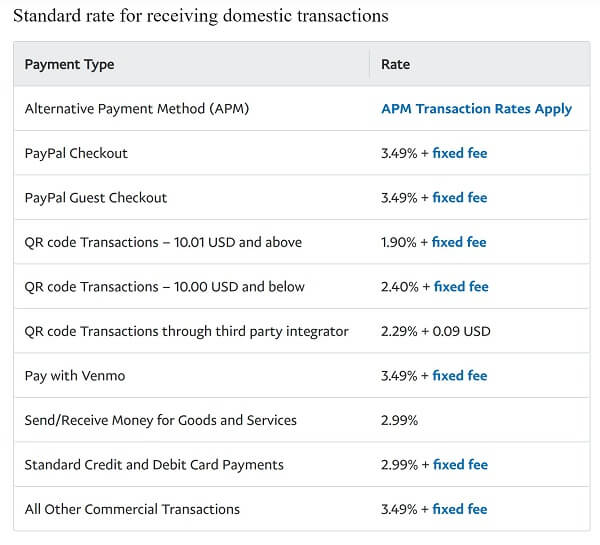
Note that for international transactions, the fees will be higher as currency conversion is also involved.
PayPal domestic fees for receiving payments vary by the payment method in which the funds were received and is generally a percentage of the amount plus a fixed fee of USD 0.49.
International Transaction Fees
If a business accepts payments from customers in another country, PayPal charges an additional cross-border fee. This fee may vary from country to country; for the US, it is currently set at 1.5%.
Micropayments Fees
If a business receives low value payments, a Micropayments fee applies. For the US, it is set at 4.99% of the received amount plus a USD 0.09 fixed fee per transaction.
Chargeback Fees
A chargeback occurs when a customer disputes a transaction and requests a refund from the bank or credit card issuer. If a chargeback occurs, PayPal charges the business a fee to cover the chargeback.
The chargeback fee varies by currency involved, and for the US, it is USD 20.
Currency Conversion Fees
If a business accepts payments in a currency other than its primary currency, PayPal will charge a currency conversion fee. This fee varies depending on the currency and for the US, it is currently 4% of the transaction amount.
As you can see, PayPal's fees can quickly stack up if you have international customers who may pay you in foreign currencies. The additional 4% fee will put a bigger dent in your pocket as total fees may be almost 7-8%.
In addition, you will likely also get PayPal's 3-4% marked up FX rate which will further reduce the final amount you get.
If your business receives international payments, you may end up paying up to 12% in worst cases once PayPal's regular fees, currency conversion fees and marked up FX rate are accounted for.
There are many cheaper alternatives to PayPal that include money transfer companies. These options generally charge much lower fees and provide highly competitive exchange rates.
But there are so many money transfer providers out there that it may become difficult to choose the best one for your needs. That is where RemitFinder's online remittance comparison platform can prove useful, using which, you can easily compare various providers side-by-side.
Withdrawal Fees
If a business wants to withdraw funds from their PayPal account to their bank account, PayPal may charge a withdrawal fee. This fee also varies depending on the country and the currency used.
For the US, the below withdrawal fees apply:
- Standard Withdrawal to a linked bank account: Free
- Instant Withdrawal to a linked bank account: 1.5%
- Standard Withdrawal to a linked debit card: Free
- Instant Withdrawal to a linked debit card: 1.5%
Also note that there is a withdrawal limit of USD 25,000 per transaction for linked bank account withdrawals. Withdrawal limits for linked debit cards are generally higher.
One good aspect of PayPal is that it does not charge a monthly maintenance fee for its business account. PayPal's fees are usage and transaction based so there are no flat monthly fees to pay.
Finally, note that there may be additional fees for certain services, such as virtual terminals and invoicing. PayPal provides a fee calculator on its website to help users determine the fees without completing the transaction.
PayPal businesses fees come in many flavors and for various transaction types. Businesses should understand these fees and factor them into their pricing strategies.
PayPal Business Account Security
PayPal takes security seriously and provides several measures to protect its users' accounts.
Here are some of the security features offered by PayPal for its business accounts:
- Two-Factor Authentication: PayPal offers two-factor authentication to help protect against unauthorized access to your account. You can enable this feature by going to your account settings and selecting the option to require a security code and password.
- Encryption: PayPal uses industry-standard encryption to protect your personal and financial information. This ensures that your information is protected during transmission and storage.
- Fraud Monitoring: PayPal has a team of specialists who monitor transactions for suspicious activity. They will notify you and take appropriate action if any suspicious activity is detected.
- Buyer And Seller Protection: PayPal offers buyer and seller protection to help protect against fraud and unauthorized transactions. This provides an additional layer of security for both parties involved in the transaction.
- PCI Compliance: PayPal is PCI compliant, which means it meets the security standards set by the Payment Card Industry Data Security Standard (PCI DSS). This ensures that your payment information is protected during transactions.
- Account Activity Notifications: PayPal sends notifications for any account activity, such as when a payment or login attempt is made. This allows you to keep track of your account activity and quickly identify any suspicious activity.
PayPal implements various security features and best practices to ensure that your businesses' information and funds are in safe hands.
Tips For Optimizing Your PayPal Business Account
To get the most of your PayPal Business Account, there are some steps you can take. These will optimize your experience and ensure that you are getting the maximum benefit from your account.
Here are some tips for optimizing your PayPal Business Account:
- Keep Your Account Information Up To Date: Make sure your business name, address, phone number and email address are accurate and current. This will ensure that your customers can contact you quickly and that PayPal can reach you with important account updates.
- Verify Your Account: Verifying your account with PayPal is important as it helps build trust with your customers and reduces the risk of fraud. You can verify your account by linking a bank account, adding a credit or debit card or applying for PayPal credit.
- Customize Your Checkout Process: You can customize your checkout process to make it more user-friendly for your customers. This includes adding your business logo, setting up shipping and tax information and providing a clear return policy.
- Use PayPal Invoicing: PayPal invoicing is a simple and convenient way to bill your customers for goods and services. You can customize your invoices, track payments and send reminders to customers who have not paid.
- Offer Multiple Payment Options: Offering multiple payment options can increase your sales and make it easier for customers to buy from you. PayPal supports various payment methods that include credit and debit cards, PayPal Credit and PayPal One Touch.
- Use PayPal's Reporting Tools: PayPal offers various reporting tools that can help you track your sales, manage inventory and identify trends. You can use these tools to make informed business decisions and optimize your operations.
- Utilize PayPal's Seller Protection: PayPal's seller protection can help protect you against fraudulent transactions and unauthorized payments. Make sure you understand the terms and conditions of seller protection and take steps to qualify for it.
Follow some of the above best practices to get the most of your PayPal Business Account.
Comparing PayPal Business Account With Other Payment Solutions
When it comes to accepting payments for your business, there are various payment solutions available in the market. Here's a comparison of PayPal Business Account with other payment solutions.
PayPal vs Airwallex
Airwallex is a global financial platform that specializes in helping businesses send and receive international money transfers and payments. With a global presence in many countries, you can lean on Airwallex for multi-currency payments across the world.
The best part about Airwallex is their transparent exchange rates and fees.
If you send money or make payments with Airwallex in AUD, CAD, CNY, CHF, EUR, GBP, HKD, JPY, NZD or SGD, your exchange rate will be marked up by only 0.5% on top of the interbank exchange rate. For all other currencies, FX markup will be 1.0%.
Similarly, there are absolutely no hidden fees with Airwallex and their pricing is transparent.
PayPal vs Square
Square is a popular payment solution that offers a free point-of-sale app and card reader that is highly suitable for small businesses and is optimized for their needs. Square also offers additional features like inventory management and customer loyalty programs.
Square charges a 2.6% + USD 0.10 fee per transaction for in-person payments, and 2.9% + USD 0.30 for online transactions. These fees are lower than most of PayPal's transaction fees.
In general, consider Square if a physical card reader is important for your business and you want to save on transaction fees. If you receive large payments and have overseas buyers and partners, consider PayPal.
PayPal vs Stripe
Stripe is a popular payment gateway known for its simple integration and developer-friendly API. While it has lower transaction fees than PayPal (2.9% + USD 0.30 for US-based transactions), it does not offer as many features.
For example, Stripe does not have a built-in invoicing feature, which may be a disadvantage for businesses that frequently invoice their customers.
PayPal vs Amazon Pay
Amazon Pay is a payment solution offered by Amazon that allows customers to pay using their Amazon account. While it is a convenient option for customers, Amazon Pay has limited features compared to PayPal, such as the ability to create and send invoices.
Amazon Pay does have lower transaction fees compared to PayPal; US payments get charged at 2.9% + USD 0.30 flat fee.
PayPal vs Google Pay
Google Pay is a digital wallet that allows customers to store their payment information and pay using their mobile devices. While it is convenient for customers, Google Pay is not as widely accepted as PayPal. It also does not offer as many features as PayPal, such as invoicing and reporting tools.
Various payment companies and solutions offer business accounts, but PayPal seems to have the most features, albeit higher fees. Compare the pros and cons of each service to see which one fits your needs the best.
Conclusion: Is A PayPal Business Account Right For You?
Whether or not a PayPal Business Account is right for you depends on your specific business needs and priorities.
One factor to consider is the transaction fees charged by PayPal, which are slightly higher as compared other payment solutions and can quickly add up if you process a high volume of transactions.
Another critical factor to consider is the range of features offered by PayPal, including invoicing, reporting tools, and seller protection, which may benefit businesses requiring these tools.
Finally, it is essential to evaluate how well PayPal integrates with your existing systems and processes and the level of customer support provided by it.
By carefully assessing these factors, you can determine whether a PayPal Business Account is the right payment solution for your business.
Do You Need To Find the Best Remit Exchange Rate for Sending Money Internationally?
RemitFinder is an online service that helps you track remit exchange rates. By checking and comparing the latest remit exchange rates, you can get the best exchange rate for your money transfers. RemitFinder, thus, helps you to get the best return for your hard-earned money.
Find the cheapest rate to transfer your hard-earned money - visit our site or download the app on Google Play or Apple App Store now.
Want to explore by country? Browse all destination countries on our send money to hub or sending countries on our send money from hub.
References:
1. PayPal business fees in the US
Categories


Similar Articles

Tax Treatment On Sale Of Property By NRI In India
Learn the tax implications for NRIs selling property in India. Understand key rules, deductions, and how to stay compliant with regulations.

Popular Mobile Wallets In Middle East And Africa
Explore popular mobile wallets in the Middle East and Africa and how they support financial inclusion and digital payments.

Popular Mobile Wallets In North America
Discover the most popular mobile wallets in North America and how they simplify payments, transfers, and everyday transactions.