
How to Send a Wire Transfer with DBS Bank
Table of Contents
- What is a Wire Transfer?
- What is DBS Bank? An Introduction
- What methods can I use to send money overseas with DBS Bank?
- What Information do I Need to Make an International Wire Transfer with DBS?
- How do I Execute an International Wire Transfer With DBS Bank?
- How to Send an International Wire Transfer with DBS Digibank Mobile App?
- How to Send an International Wire Transfer with DBS Digibank Website?
- Are There Any Fees I Need to Pay on my DBS Bank Wire Transfer?
- What Are the Benefits of Using DBS Bank Wire Transfers?
- When Can I Expect My DBS International Wire Transfer to Arrive?
- How Much Money Can I Send With DBS Bank Wire Transfers?
- What Exchange Rate Will I Get on my DBS Bank Wire Transfers?
- Which Countries Can I Send to Using DBS Bank Wire Transfer?
- What is the Cut-off Time for DBS Bank Wire Transfers?
- How do I Receive Wire Transfers from Abroad into my DBS Bank Account?
- How Can I Get in Touch with DBS Bank?
- Conclusion
Wire transfers are a fast and efficient way to transfer money between banks. They are electronic, secure and not too complicated to execute.
However, when sending a wire transfer, it's important to know how to do it correctly. If you are sending an international wire transfer from Singapore, DBS Bank makes the process easy with its online banking system.
In this article, we will walk you through the steps of sending an international wire transfer with DBS Bank, Singapore.
What is a Wire Transfer?
There are many ways to move money electronically, but a wire transfer is one of the most common. A traditional wire transfer involves two banks and uses a network such as SWIFT or Fedwire.
Wire transfers are typically used to send money between bank accounts, pay bills, or purchase items online. Many banks also allow customers to transfer money online. Wire transfers are a quick, dependable, and secure way to send money.
What is DBS Bank? An Introduction
DBS Bank Limited is commonly referred to as DBS. It's a Singaporean corporation that offers banking and financial services. The company headquarters are located at the Marina Bay Financial Centre in Marina Bay, Singapore.
DBS Bank provides personal and professional banking services including savings accounts, fixed deposits, cash flow and assets management, foreign exchange options, structured investments, loans, and insurance packages, plus private banking, SME support, corporate finance account handling, and treasury operations.
DBS has a global presence with offices in Singapore, China, Hong Kong Special Administrative Region (SAR), India, Indonesia, Malaysia, Taiwan Province of China, UAE, and Japan.
DBS Bank is the largest bank in Singapore and operates across many Asian countries.
DBS Bank Singapore is one of the leading banks globally with a regional network extending across 250 branches (including 100 in Singapore) and 1,100 ATMs located across 50 cities in 15 markets.
What methods can I use to send money overseas with DBS Bank?
DBS Bank offers a few ways you can send money to someone residing in another country.
One possible way is to use DBS Remit which is DBS Bank's international remittance service. The second option is the DBS wire transfer service that allows you to send money overseas to another person or bank account. This can be useful if you need to make a large payment for something like buying a property or paying tuition fees.
There are three ways to send money from your DBS bank account in Singapore. DBS offers its users the ability to send money online via DBS remit, through internet banking, or at any DBS branch.
1. DBS Remit
DBS Remit facilitates same-day transfers to India, the Philippines, Malaysia, Indonesia, China, Hong Kong, the UK, US, Australia, or Eurozone. You can set up these transfers online.
2. Online Wire Transfers using internet banking
If your country is not supported by DBS Remit, you can still use their convenient internet banking service to send an international wire transfer.
3. Visit your nearest DBS branch
You can also arrange a transfer in person by going to a bank and asking a teller for assistance. Remember to take your passport or identity card, as well as your bank passbook or ATM card, to prove your identity.
When you arrive at the bank, head to the teller and fill out a form for a telegraphic transfer. The teller will then confirm your identity and the specifics of the transfer before processing it.
You can send money overseas with DBS Bank in many ways.
What Information do I Need to Make an International Wire Transfer with DBS?
Before you can make an international money transfer with DBS, you will need the following information:
- Recipient's bank name
- Recipient's bank account number
- Recipient's bank SWIFT code
- Recipient's full name
- Recipient's full address
- The currency and amount of money you wish to send
- The reason for the transfer
- Agent bank charges can be "Charge to Me" or "Charge to Recipient"
Once you have entered all this information, you can review and confirm your transfer details. When you have confirmed the transfer, the money will be sent to the recipient's bank account.
What is DBS Bank SWIFT Code?
Overseas money transfers will go more smoothly if the sender has your bank's DBS Swift code. This is similar to a postcode and ensures that the payment arrives at your correct bank. Without this code, payments could be delayed or unsuccessful.
The DBS Bank SWIFT code is DBSSSGSG.
Note that DBS Bank does not have an IBAN, BIC, Routing Number or Sort Code; the DBS SWIFT Code is all you need to ensure the funds are routed correctly into your DBS bank account.
DBS Bank's SWIFT Code is DBSSSGSG. There is no IBAN, BIC, Routing Number or Sort Code needed for DBS.
How do I Execute an International Wire Transfer With DBS Bank?
You can easily send international wire transfers using either the DBS Bank digibank website or the digibank mobile app1. In the sections below, we will provide instructions for both of these mechanisms to start a new wire transfer with DBS.
You can send international wire transfers via DBS Bank with both the DBS digibank website or mobile app.
How to Send an International Wire Transfer with DBS Digibank Mobile App?
Follow the below steps to send an international wire transfer with the DBS Bank digibank mobile app:
- Step 1 – Login into the DBS digibank mobile app. Open the DBS digibank mobile app on your phone, and login with your Touch/Face ID or digibank User ID & PIN.
- Step 2 – Start a new wire transfer request. On the main menu on the digibank app, click on Pay & Transfer. Then click on the Overseas icon to start a new international wire transfer.
- Step 3 – Select or Add a recipient. Next, select a recipient you want to send the money to from an existing recipient in your list of saved recipients. You can also add a new recipient if you wish to; they will get saved in the list for the future as well.
- Step 4 – Add wire transfer details. In this screen, you can provide the necessary wire transfer details like the transfer amount, source of funds and the reason for the transfer. Once done, click on the Next button at the bottom of the screen.
- Step 5 – Review your transfer. Before you submit your transfer, you are presented with a review screen. Here you can also see the foreign exchange rate applied by DBS to your transfer as well as any applicable transfer fees. Once you are satisfied with everything, click on Transfer Now to start your transaction.
- Step 6 – Transfer submitted. Once your overseas funds transfer request has been accepted by the DBS system, you will see a confirmation screen that shows your transfer is now processing.
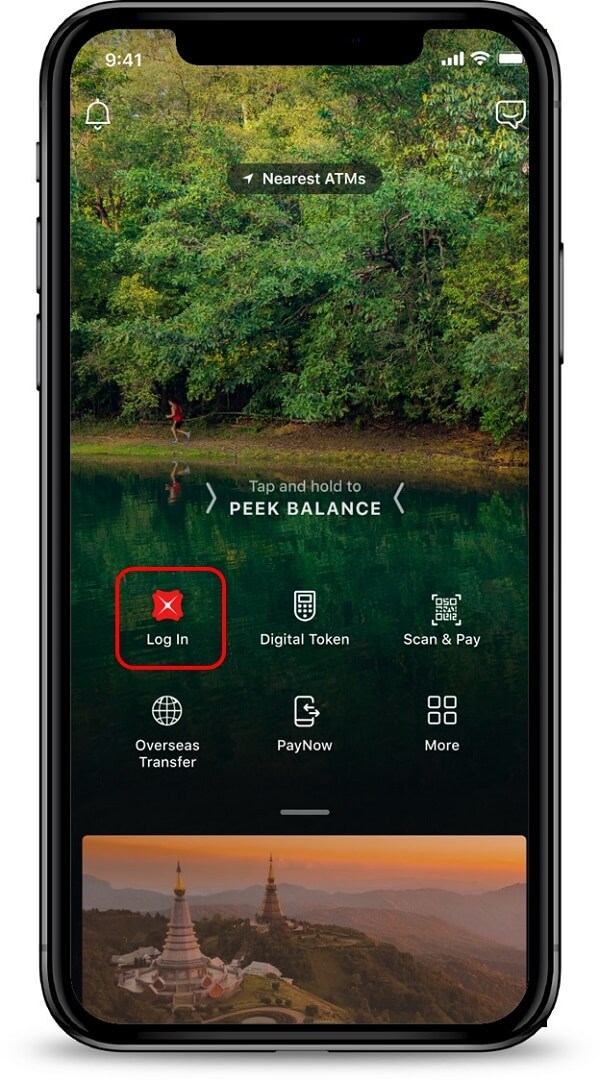
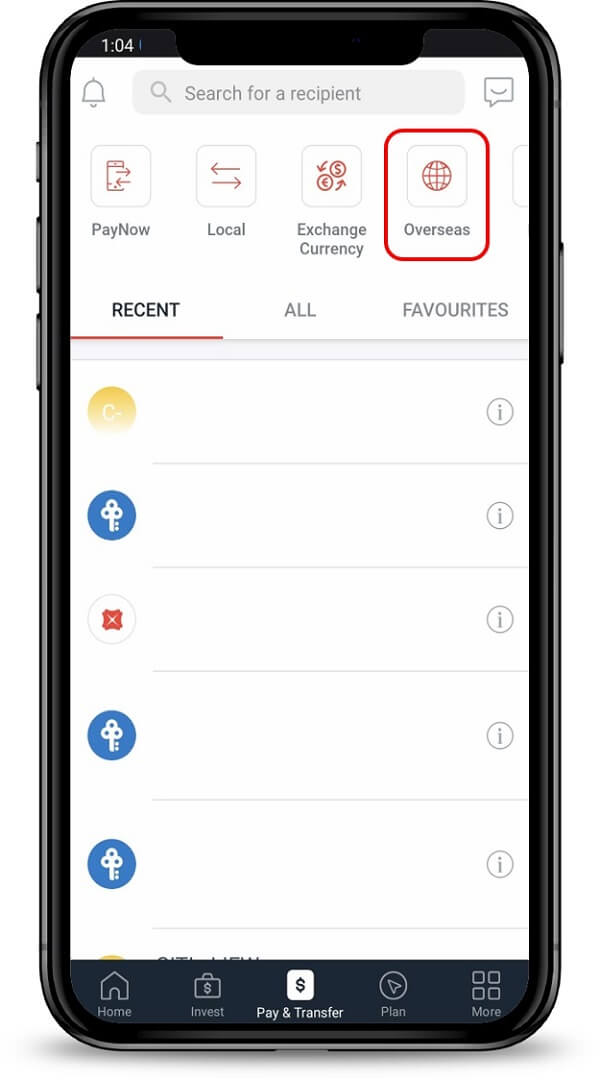
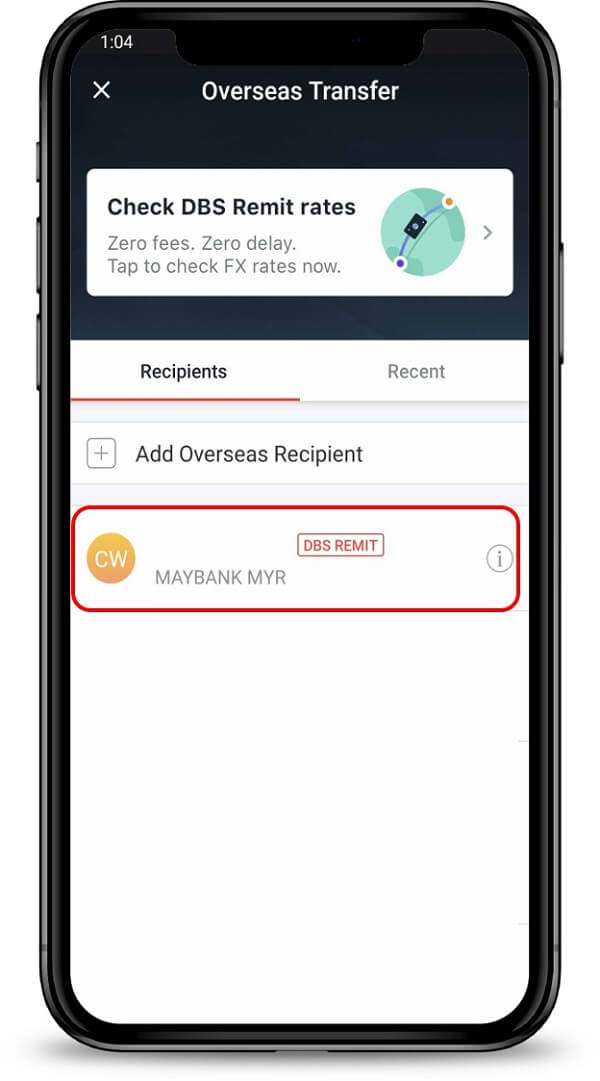
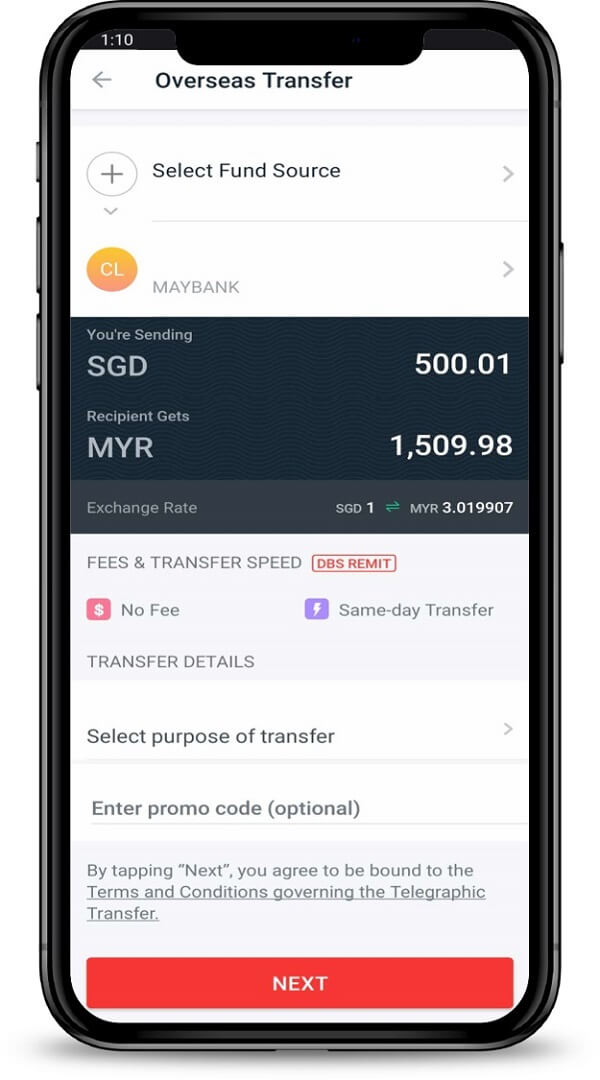
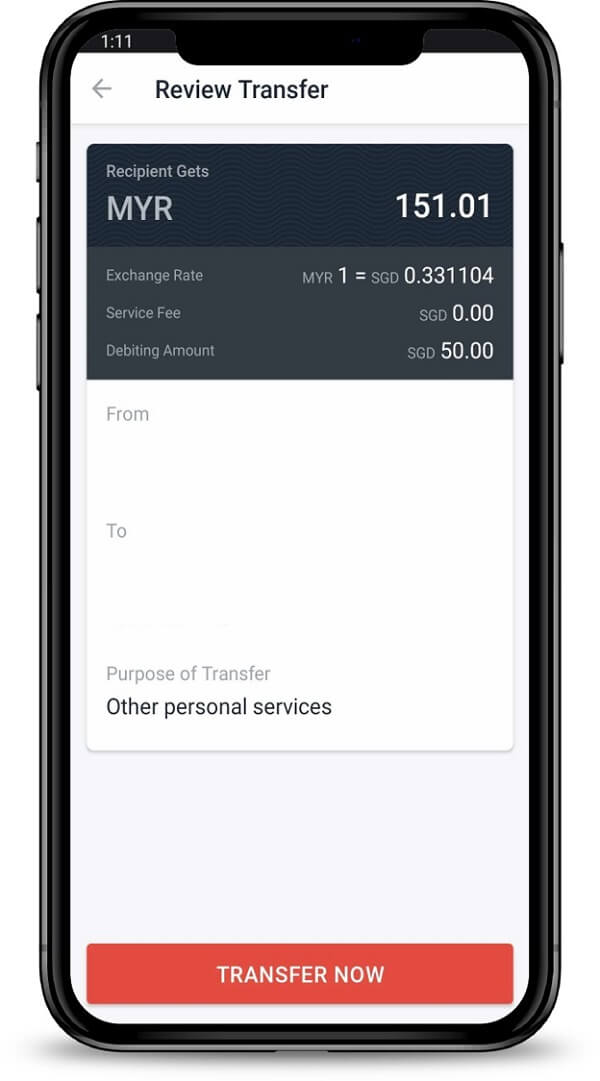
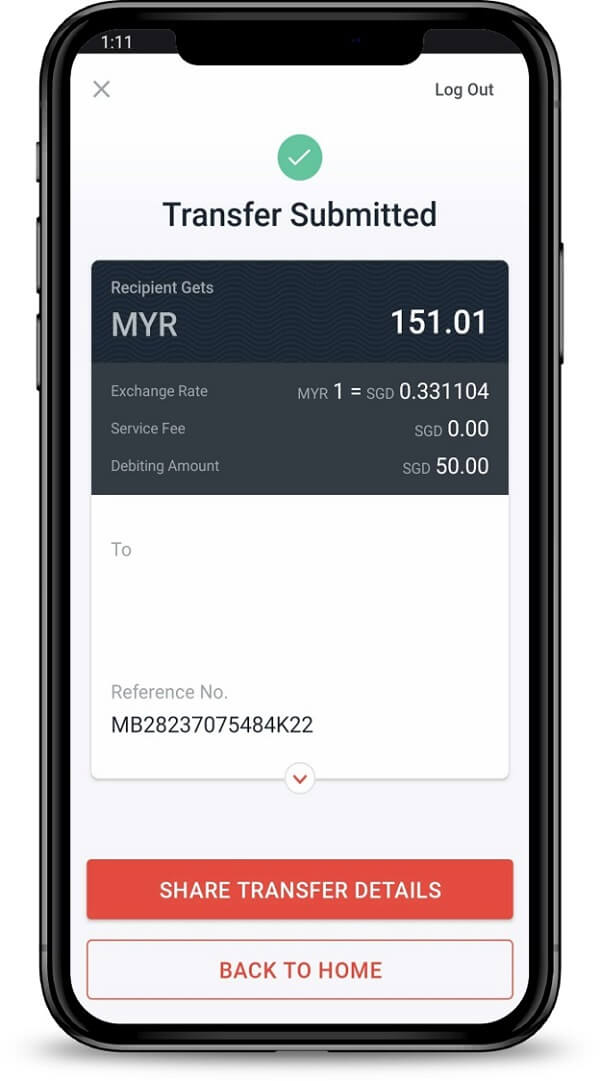
That is all you have to do. From this point on, DBS will process your transaction, and if all goes well, the funds will be successfully transferred to your overseas recipient. DBS will also keep you informed of the whole transfer process.
You can send a wire transfer from your DBS Bank mobile app in just a few simple steps.
How to Send an International Wire Transfer with DBS Digibank Website?
To send an international wire transfer with the DBS Bank digibank online website, follow the below steps:
- Step 1 – Login into digibank online. Go to the DBS Bank digibank online website and sign in with your User ID and PIN.
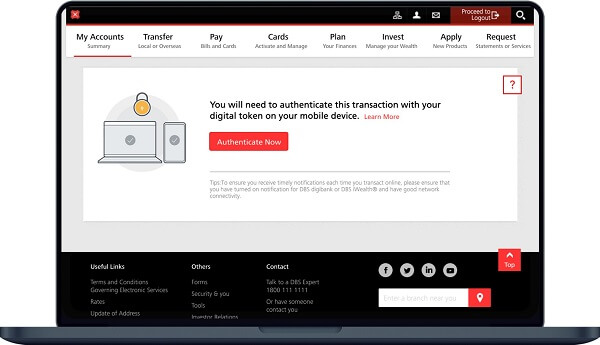
- Step 2 – Finish 2 factor authentication. To protect your funds and private information, finish the 2 factor authentication (2FA) process using your registered mobile device. After competing this step, you will be successfully logged in into the digibank online portal.
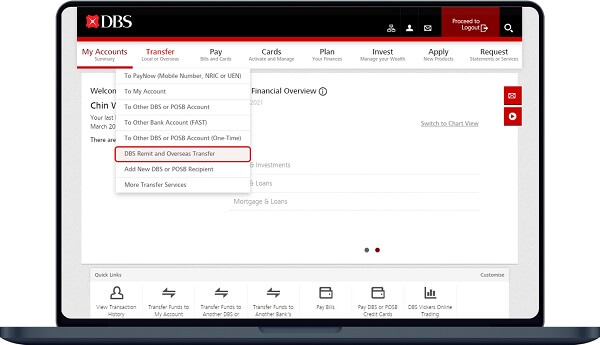
- Step 3 – Start a new transfer. In the main menu, look for the Transfer option, and within that, click on the "DBS Remit and Overseas Transfer" sub-menu to start a new money transfer request.
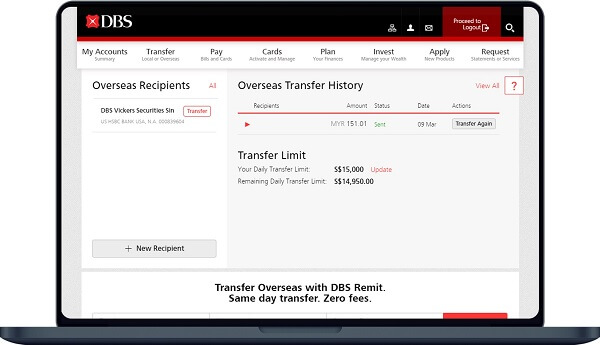
- Step 4 – Select a recipient. If you are sending money to someone who have sent to in the past, you can select them from the list of your saved recipients. If this is someone you are sending money to for the first time, you can add them as a new recipient.
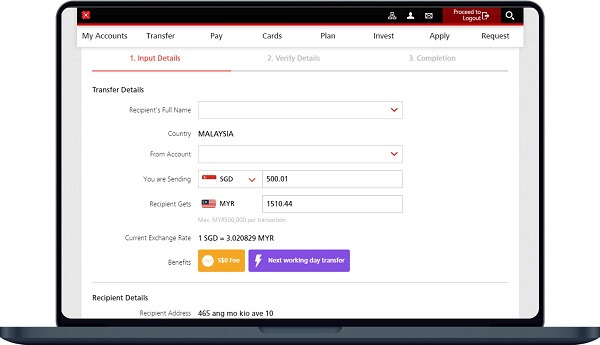
- Step 5 – Enter transfer details. In this step, you will provide important transfer information like your source and destination currencies (source will be SGD) as well as your transfer amount. The digibank online website will show you the foreign exchange rate that will apply to your transaction as well as any applicable sending limits.
- Step 6 – Enter recipient details. Now, enter the details about your recipient as well as the reason for your money transfer. If you have any DBS Bank coupon codes available, you can add them here as well. You will need to review the "Terms and Conditions governing Telegraphic Transfer" and acknowledge that you have read the same before you can proceed forward. Once done, click on the Next button.
- Step 7 – Verify your transfer details. On this screen, you are shown all the details of your money transfer request – this includes the amount, fee as well as the applicable exchange rate. Once you are satisfied with everything, submit your transfer by clicking on the Submit button at the bottom.
- Step 8 – Transfer confirmation. The DBS digibank portal will show you a confirmation screen that shows that your money transfer has been successfully accepted by the system, and is in the processing stage.
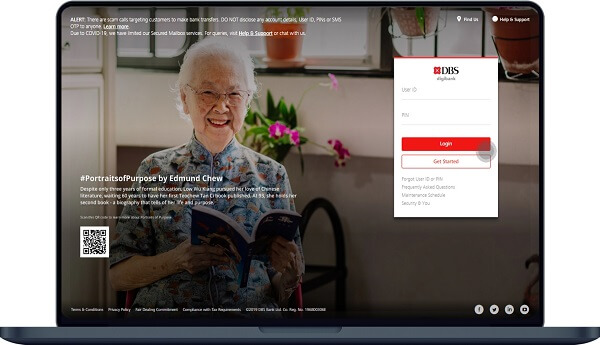
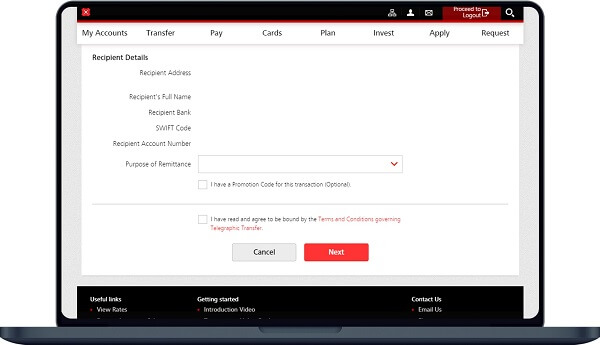

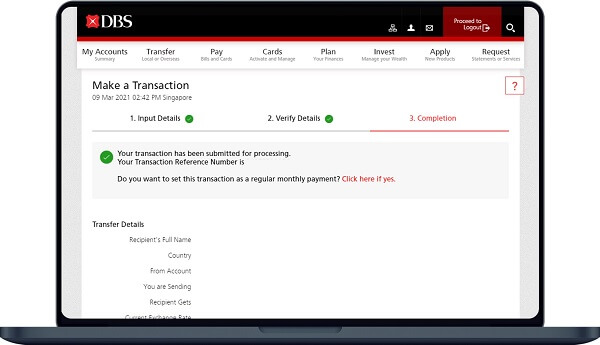
That's it. In just a few clicks, you have successfully submitted an international money transfer with DBS Bank. From this point on, DBS will process your transaction, and the funds will be credited into your overseas recipient's bank account in their country.
It is quick and easy to send an international wire transfer using the DBS Digibank online website.
Are There Any Fees I Need to Pay on my DBS Bank Wire Transfer?
With DBS Bank, there are no service charges or fees for transfers within DBS accounts.
However, there are wire transfer fees for transfers to accounts outside of DBS, including international wire transfers to overseas account. Such fees will be displayed during the transfer process.
DBS Bank provides a really useful online tool2 to see how much transfer fee you will pay on your international money transfers with them. This tool looks as below:
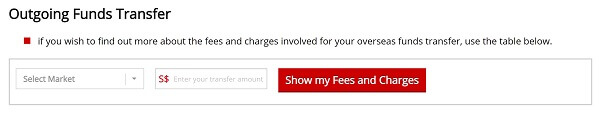
Simply enter your destination country and the wire transfer amount you wish to send, and click on the button to see how much fees you will have to pay.
For example, for a Singapore to India money transfer with DBS Bank, the following fees apply:
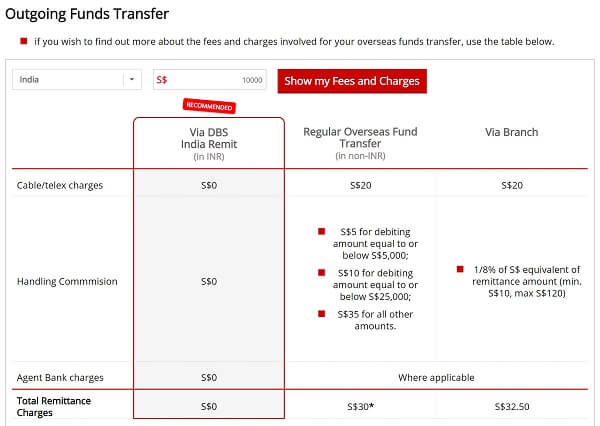
In this case, you can see that you can send money to India from Singapore for free using DBS Remit, whilst you will need to pay SGD 30 for an online wire transfer to India. If you choose to work with a DBS banker in a branch, you will need to pay SGD 32.50 on your international money transfer to India.
Use the DBS Bank international funds transfer fee calculator to see how much fees you will have to pay for your money transfer.
Also, notice that the overall transfer fee charged by DBS has sub-components to it, and is calculated as below:
- If you send your transfer using DBS Digibank online or the mobile app, the transfer fee is between SGD 25-55 per wire transfer based on the amount you send. The overall transfer fee is calculated as below:
- Fixed cable/telex wire fee of SGD 20
- Handling commission fee of SGD 5 for sending amounts up to SDG 5,000, SGD 10 for up to SGD 25,000 and SGD 35 for higher amounts.
- Additional agent bank fees may also apply.
- If you send your wire transfer in a DBS Bank branch with the help of a DBS Bank banker, the fee will be anywhere from SGD 30-140, and is calculated as below:
- Fixed cable/telex wire fee of SGD 20
- Handling commission fee that is 0.125% of the transfer amount with a minimum SGD 10 fee and maximum SGD 120 fee.
- Additional agent bank fees may also apply.
You can expect to pay between SGD 25-55 online and SGD 30-140 in a branch for your DBS Bank international wire transfers. Send online to save on extra fees applicable in a branch.
Make sure to use DBS Bank's online fee calculator to carefully check all the fees before you plan your money transfer with them.
Many banks do not provide this level of transparency to their fees, so we commend DBS Bank on maintaining full transparency on this front. Their online fee calculator is a huge plus for customers who are planning to send money overseas with them.
DBS Bank maintains full transparency on their wire transfer fees with their online fee calculator.
What Are the Benefits of Using DBS Bank Wire Transfers?
Some benefits of using DBS Bank for international wire transfers include:
- Wide ranging currency support
- Simple and easy to use
- Safe and secure
- Lower fees for sending online vs in a branch
Wire transfers can be a quick and easy way to send money overseas. However, it is important to make sure you have all the necessary information before starting the transfer, as DBS cannot be held responsible for any incorrect details that are provided.
When Can I Expect My DBS International Wire Transfer to Arrive?
Domestic wire transfers are generally faster than international wire transfers. SWIFT is frequently used for international wire transfers, and intermediary banks may occasionally be involved.
The average turnaround time for an overseas funds transfer is two to four business days. You can complete same-day transfers within the cut-off times to specific markets using DBS Remit.
Take note of the following important points when it comes to DBS Bank wire transfer speed:
- Before the cut-off time on a business day, DBS Remit will transmit foreign funds on the same day.
- The receiving bank's account will be credited with any international funds transfers the next business day for those made over the weekend or on a holiday.
- Your international money transfer may be delayed depending on national, regional or other bank holidays.
- For transfers of more than SGD 200,000, please visit any DBS branch.
- Always check the costs associated with your overseas fund transfer before you start your transaction.
There are several factors that can influence the speed of your DBS Bank international wire transfers.
How Much Money Can I Send With DBS Bank Wire Transfers?
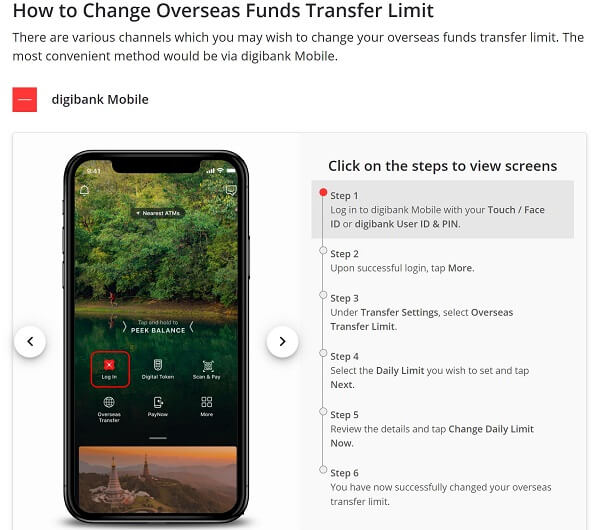
A daily cap of SGD 200,000 applies when sending wire transfers through the DBS mobile app or website. Branch transfers are unrestricted; so, if you want to send more than SGD 200,000, you will have to send your wire via a DBS Bank branch in person.
You can send SGD 200,000 daily using DBS digibank online or mobile app. Transfers sent via a DBS branch have no limits.
You also must send a minimum amount of at least SGD 500 for money transfers with DBS Bank.
Finally, you can request to increase your sending limit from within the DBS Bank digibank mobile app. The below screenshot presents the steps to do so:
What Exchange Rate Will I Get on my DBS Bank Wire Transfers?
DBS Bank strives to provide customers the best possible foreign exchange rate.
All DBS Bank international wire transfer FX rates are locked 24x7 with the following exceptions:
- Chinese Yuan (CNY) exchange rates are confirmed only between 09:15 and 15:00 (SGT) on business days.
- Myanmar Kyat (MMK) exchange rates are confirmed only between 09:25 and 17:00 (SGT) on business days.
- Mauritian Rupee (MUR) and New Taiwan Dollar(TWD) exchange rates are confirmed only between 09:25 to 17:00 (SGT) on business days only.
- For the above currencies, exchange rates will be indicative on non-business days and national public holidays.
DBS Bank also provides preferential foreign exchange rates if you send SGD 50,000 or more to any international destination except Malaysia, Philippines, Mainland China & Indonesia.
DBS Bank provides locked-in exchange rates for most major currencies, as well as preferential rates if you send more than SGD 50,000.
That said, banks generally provide lower exchange rates than money transfer specialists. We, therefore, recommend that if you need to send money overseas, you should always check money transfer companies focused on moving money abroad.
An easy and efficient way to check the latest exchange rates is to rely on RemitFinder's online money transfer comparison engine. You can easily compare various money transfer companies and pick the one that suits your needs best.
Which Countries Can I Send to Using DBS Bank Wire Transfer?
DBS provides fund transfer services to more than 200 countries across the world. Supported currencies include all major global currencies like USD, EUR, GBP, CAD, SGD, HKD, and AUD.
DBS strives to provide fast, convenient, cost-effective, and cost-effective service through their dedicated partner bank arrangements.
What is the Cut-off Time for DBS Bank Wire Transfers?
If you and your recipient are in different countries, you will need to make an international wire transfer to move money between your bank accounts.
Most banks have cut-off times after which your wire transfer will get processed on the next business day. Make sure to check the cut-off time before starting an international wire transfer.
If the transfer is funded after the daily cut-off, the beneficiary will receive the funds on the next working day, counting from when you first initiated the money transfer.
Below are DBS Bank's cut-off times for various countries you can send wire transfers to:
- Australia: 12:00 pm
- Bangladesh: 11:00 am
- Canada: 5:00 pm
- China: 3:00 pm
- Eurozone: 5:00 pm
- Hong Kong: 4:30 pm
- India: 4:30 pm
- Indonesia: 2:00 pm
- Japan: 10:30 am
- Malaysia: 2:00 pm
- Myanmar: 12:00 pm
- New Zealand: 10:00 am
- Philippines: 11:00 am
- South Korea: 2:00 pm
- Thailand: 11:30 am
- United Arab Emirates (UAE): 5:00 pm
- United Kingdom (UK): 5:00 pm
- United States (US): 5:00 pm
- Vietnam: 2:30 pm
Be aware of DBS Bank's wire transfer cut off times to prevent delays in your transfer.
How do I Receive Wire Transfers from Abroad into my DBS Bank Account?
The good news is that you pretty much have to do nothing to receive international wire transfers into your DBS bank account. The sender will do all the work, and the funds will simply show up in your account.
However, for the wire transfer to finish successfully, the sender will need DBS Bank information that is critical to ensure the money gets to your account without any problems.
Below is the information you should provide to the sender to receive funds from a foreign country:
- Your name as per the records of DBS Bank
- Your DBS bank account number
- Name of beneficiary bank: DBS Bank
- Address of beneficiary bank: 12 Marina Boulevard, DBS Asia Central, Marina Bay Financial Centre Tower 3, Singapore 018982
- DBS SWIFT Code: DBSSSGSG
Make sure to provide the sender accurate details (including DBS SWIFT Code: DBSSSGSG) to ensure your incoming wire finishes without any issues.
To find out how to verify that your funds have been received, see Check Account Transaction by visiting the DBS website or mobile app.
What are the Fees for Incoming DBS Bank Wire Transfers?
Incoming wire transfers into current DBS bank accounts in Singapore dollars or other currencies are subject to a handling commission fee of SGD 10. Note that this fee is waived for DBS Treasures customers.
DBS Bank charges an incoming international wire transfer fee of SGD 10.
How Can I Get in Touch with DBS Bank?
Do you have more questions about your DBS wire transfer? You can contact DBS for more information about sending or receiving international transfers through the following channels:
- DBS website's contact us page
- DBS 24-hour hotline: 1-800-111-1111; (65) 6339 6963 from overseas
- A virtual assistant (DBS website)
- Via Facebook and Twitter (@dbsbank)
- Email using DBS online email form
Conclusion
If you are a Singapore resident (including overseas individuals and expats settled in Singapore), you will likely need to send money overseas to your family, or for business purposes.
DBS Bank is the largest and most popular bank in Singapore, and you can send money using DBS in several ways.
In this guide, we discussed all the ins and outs of sending money overseas with DBS Bank including detailed step-by-step guides to send money using the DBS Bank digibank website as well as the mobile app. Additionally, we covered transfer fees, exchange rates, transfer times as well as other useful information so you can make the best out of your money transfers with DBS.
Do You Need To Find the Best Remit Exchange Rate for Sending Money Internationally?
RemitFinder is an online service that helps you track remit exchange rates. By checking and comparing the latest remit exchange rates, you can get the best exchange rate for your money transfers. RemitFinder, thus, helps you to get the best return for your hard-earned money.
Find the cheapest rate to transfer your hard-earned money - visit our site or download the app on Google Play or Apple App Store now.
Want to explore by country? Browse all destination countries on our send money to hub or sending countries on our send money from hub.
References:
1. DBS Bank's overseas funds transfer guide
2. DBS Bank's overseas funds transfer fee calculator
Categories


Similar Articles


CNAPS Codes Unraveled: Navigating China's Banking Landscape
Discover CNAPS Codes: China's unique bank identifier for fast, secure transactions. Learn how CNAPS Codes simplify payments across China's banking system.

ABA Routing Numbers In The US: A Comprehensive Guide
Discover what ABA Routing Numbers are, how they work and their importance in US banking transactions like direct deposits, online transactions and wire transfers.

What Is A NUBAN Number And What Is It Used For?
Learn what a NUBAN number is and how it helps identify bank accounts in Nigeria for secure and efficient transactions.