
How to Pay Australia and New Zealand Taxes from Overseas
Table of Contents
- Paying the ATO from overseas is easy with OFX
- What are the benefits of paying the ATO using OFX?
- How do ATO payments with OFX work?
- How do I make ATO payments with OFX?
- What steps do I need to follow to make ATO payments with OFX?
- ATO x OFX Partnership FAQs
- How does the ATO payment process with OFX work?
- If I'm an existing OFX customer, how do I add the ATO as a recipient in my OFX account?
- What are the benefits to using OFX to pay ATO taxes?
- I have a question or prefer to speak to someone. How should I contact OFX?
- Paying New Zealand Inland Revenue from overseas just got easier
- How do New Zealand IRD tax payments with OFX work?
- What are the main benefits to choose OFX for making IRD tax payments?
- What steps do I need to follow to make IRD tax payments using OFX?
- How can I get help for making IRD tax payments via OFX?
- More information about OFX
- Conclusion
One of the biggest problems that Australians and New Zealanders settled overseas face is fulfilling their tax obligations back home. For Australia, payments need to be made to the Australian Tax Office (ATO) and for New Zealand, overseas Kiwis need to pay their obligations to the Inland Revenue Department (IRD).
Typically, overseas Aussies and Kiwis have had to keep bank accounts open in Australia and New Zealand to fulfill these annual tax payments. Sometimes, they have to rely on family or friends to help make these payments, or even mail paper cheques from overseas.
In today's digital age where we do virtually everything online, it seems that paying taxes from overseas in the aforementioned ways is years behind.
But we have some really good news to share. Overseas Australians and New Zealanders can now make their tax payments from overseas using OFX, a premier global money transfer company that has been in the currency conversion and money transfer business for decades.

If you are an Australian or a New Zealander settled overseas, and have direct or indirect income back home, or have any other financial assets that generate income that necessitate tax payments, read on to see how OFX has made paying your taxes so much simpler and easier!
Paying the ATO from overseas is easy with OFX
OFX has a connected payment service with the Australian Tax Office (ATO) that facilitates direct ATO payments from your OFX account.
This means that your ATO tax payments and Higher Education Loan Payments (HELP) repayments can now be paid in multiple currencies and reconciled directly using your unique "PRN" (Payment Reference Number) straight from the OFX platform.
If you need to make payments to the Australian Tax Office (ATO) from outside of Australia, things just got a whole lot easier.
What are the benefits of paying the ATO using OFX?
There are numerous advantages to rely on OFX to make your ATO tax payments; we list the main benefits of doing so below.
- Direct seamless payment process to the ATO
- Savings on FX costs; it's goodbye to unnecessary FX or credit card fees and hello to OFX's competitive exchange rates and $0 OFX transaction fees1 on every transfer
- 24/7 OFXpert support when you need it, simple digital platform when you don't
- Payments in 20+ currencies
How do ATO payments with OFX work?
It is seamless to pay the ATO using OFX, and below are the ways OFX makes this easy for you:
- Any payment you make via OFX to the ATO will be directly reconciled with your unique "PRN" (Payment Reference Number).
- You no longer have to transfer money back to your Australian bank account, or pay with your credit card.
Have individual or corporate tax commitments in Australia or New Zealand? OFX have you covered.
How do I make ATO payments with OFX?
Making ATO tax payments using OFX is simple and easy to do; follow the below steps to make this happen:
- Register with OFX
- Select the ATO as a money transfer recipient from your OFX account
- Select your currency and enter your payment amount
- Enter your "PRN" (Payment Reference Number); you can find it on your ATO statement
- Send your funds to OFX
OFX will do the rest quickly2 and securely, and they will confirm your payment directly with the ATO.
Already an OFX customer?
Log in to OFX here and the ATO will be automatically added as a recipient within your OFX account.
What steps do I need to follow to make ATO payments with OFX?
You can follow the below step by step guide to book your transfer to the ATO from your OFX account.
- Step 1. Sign in into your OFX account and start a new money transfer: Login to your OFX account here and the ATO will be automatically added as a recipient within your OFX account. Once you're logged in, click 'New Transfer'. Add in currencies and the amount you want to transfer. Click 'Continue'.
- Step 2. Add the recipient: You will then be prompted to 'Add a recipient' (which would have automatically been added to your recipient list).
- Step 3. Add the ATO Payment Reference Number: Add your ATO Payment Reference Number (the box will appear once you have selected 'ATO' as your recipient) and your 'Reason for Transfer' (Tax Payment has been used as an example below). Once done, click on 'Choose a payment method'.
- Step 4. Choose your payment method: In this step, choose how to pay for your ATO money transfer with OFX. After you have selected your preferred payment method, click on 'Review transfer details'.
- Step 5. Confirm your transfer: Please review the transfer details. If they are correct, click 'Confirm'.
- Step 6. Send funds to OFX: OFX will confirm your transfer has been booked and provide you with a few options to send your funds.
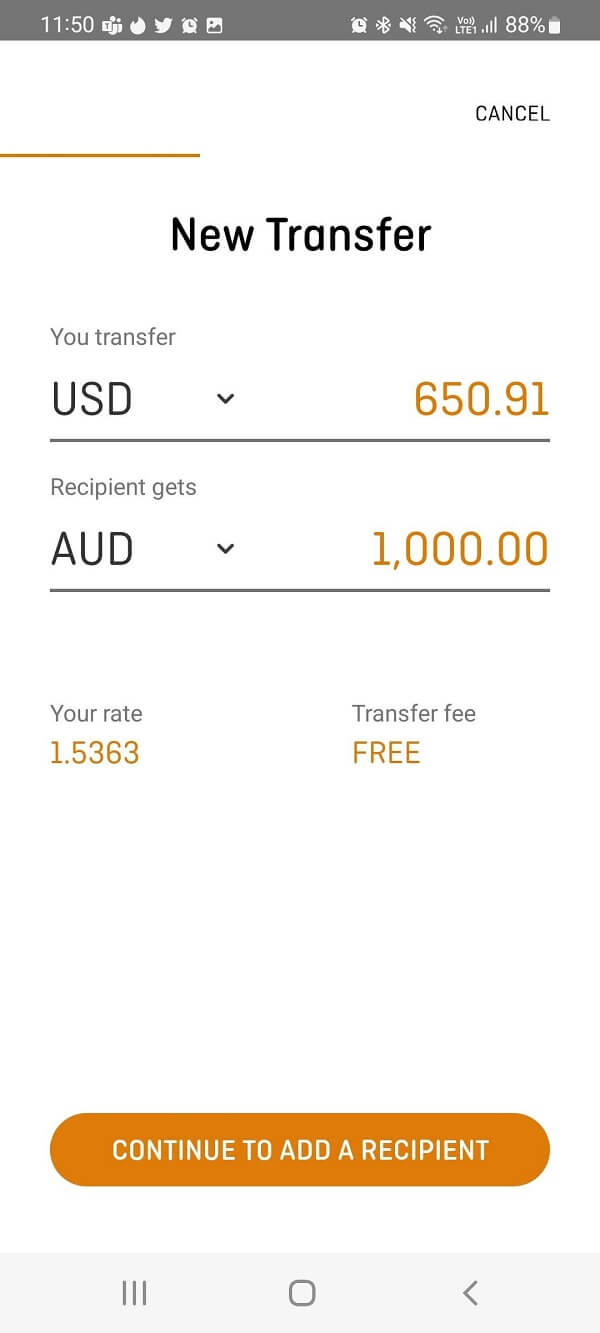
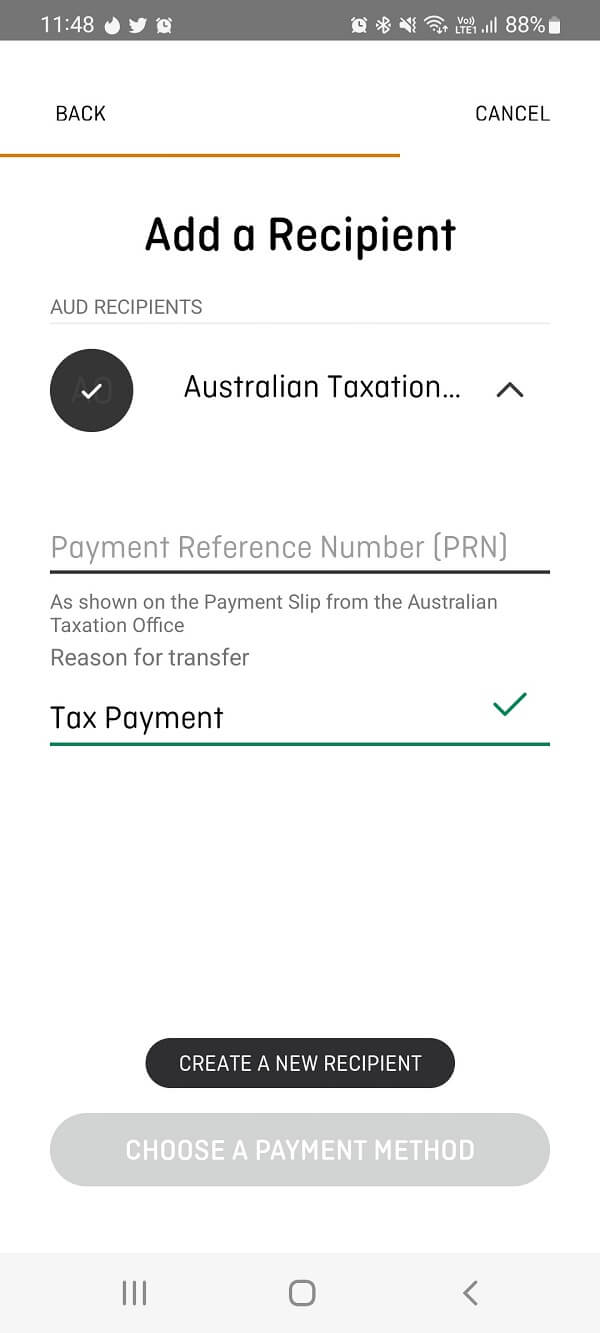
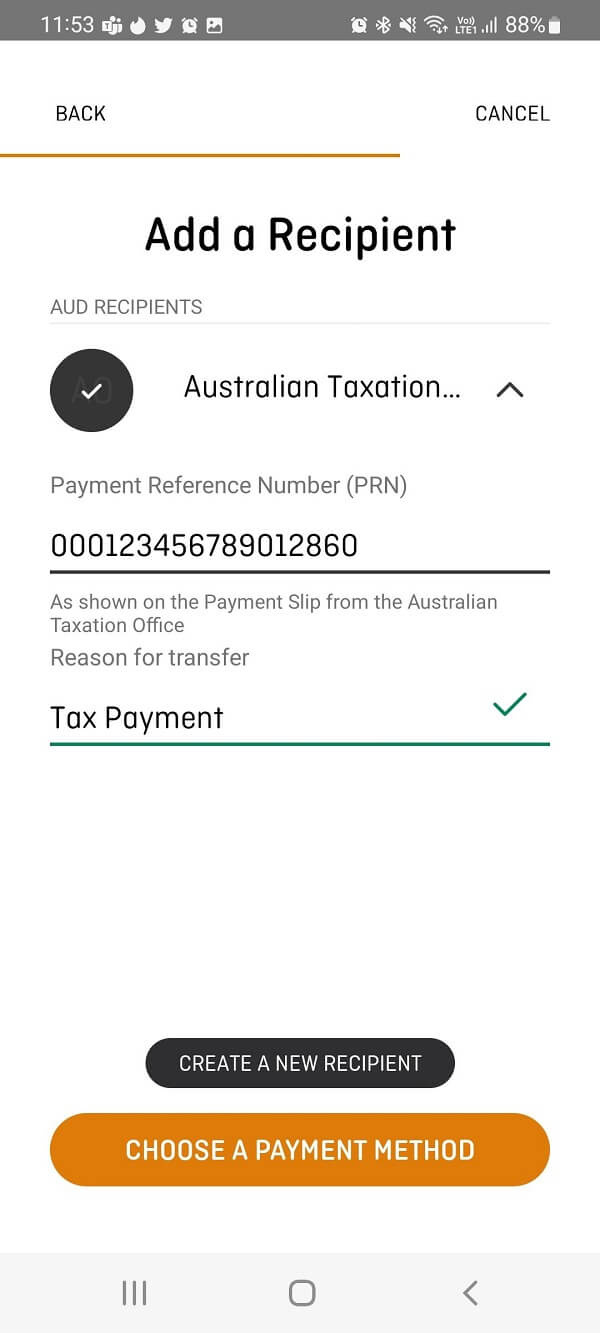
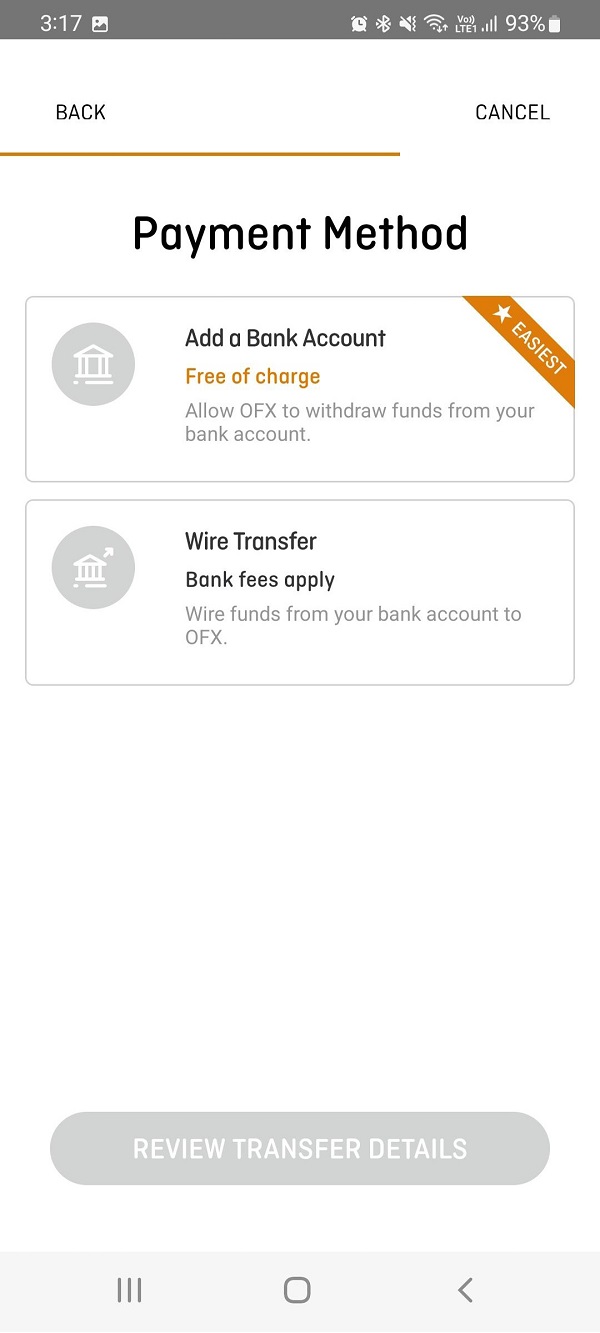
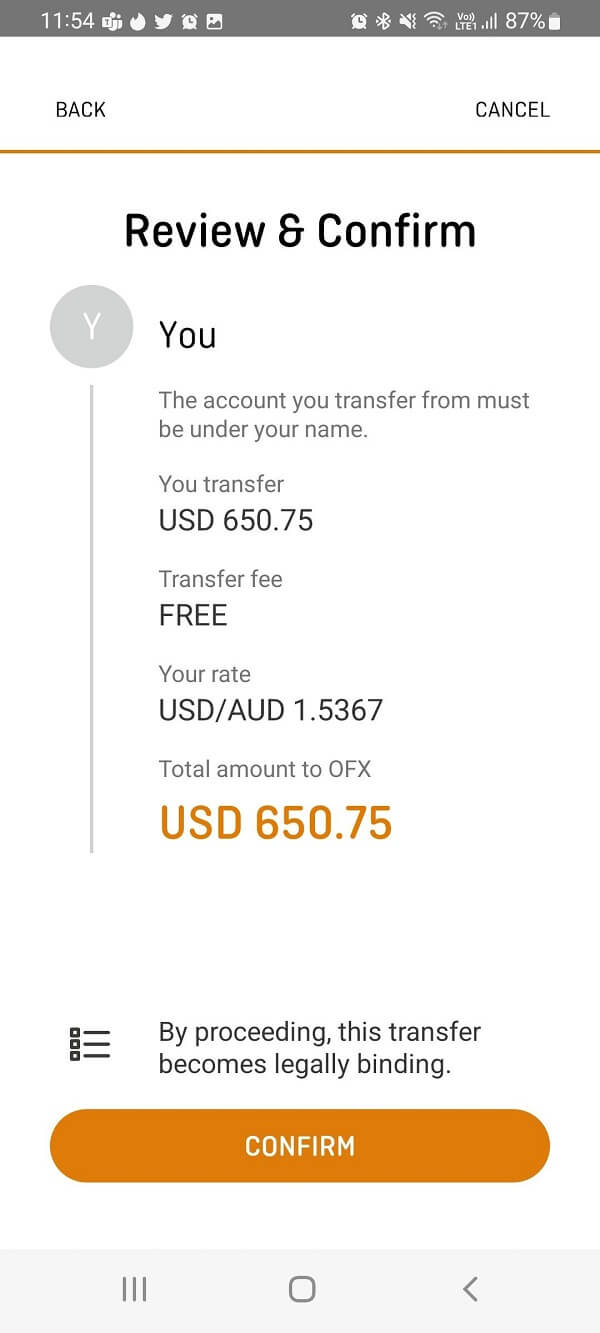
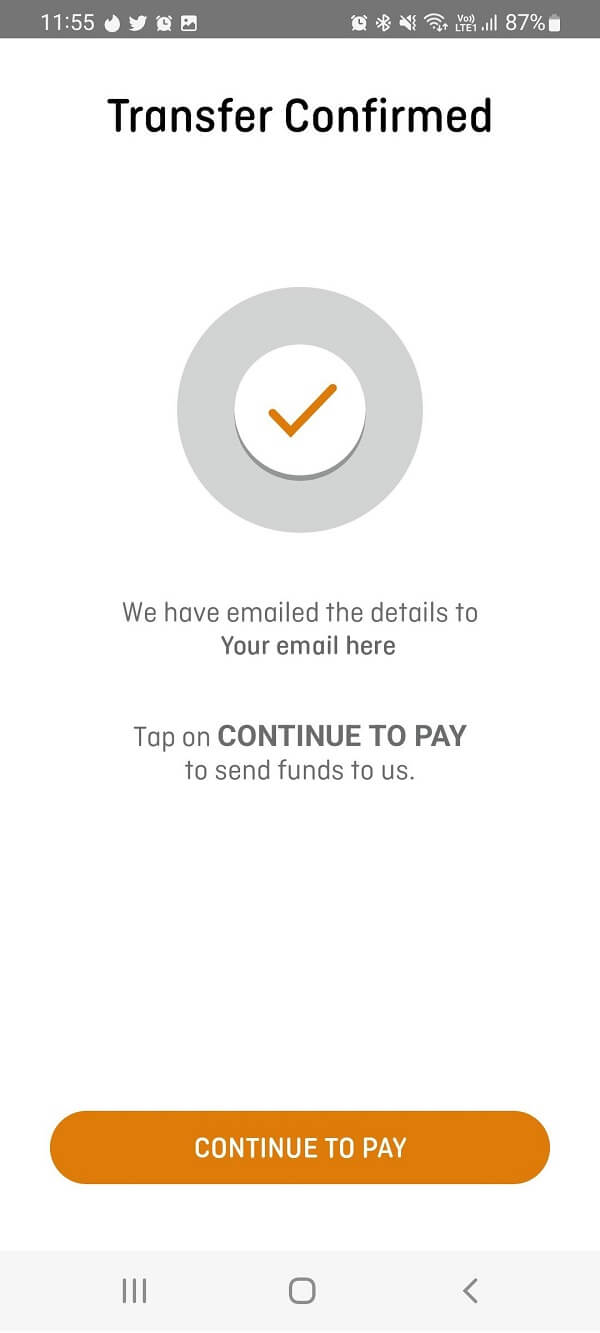
It is quick and easy to send ATO tax payments directly from your OFX account.
From this point on, all you have to do is fund your OFX transfer like any other regular money transfer you make using OFX. Once OFX gets your funds, your transaction will be processed and the final payment will be made to the ATO on your behalf.
Are you ready to book your transfer to the ATO with OFX?
Login to OFX here and the "ATO" will be automatically added as a recipient within your OFX account.
ATO x OFX Partnership FAQs
How does the ATO payment process with OFX work?
When you're ready to make a transfer, select 'ATO' as a recipient, confirm your Payment Reference Number (PRN) and transfer the funds to OFX. OFX will then process the payment.
If I'm an existing OFX customer, how do I add the ATO as a recipient in my OFX account?
Click into your OFX account using this link and the ATO will automatically be applied as a recipient.
What are the benefits to using OFX to pay ATO taxes?
Here are the reasons to connect to OFX for making your ATO payments:
- Competitive exchange rates: Keep more of your money as it travels around the world
- Fast Transfers: 80% of all major currency transfers processed in 24 hours on receipt of funds to OFX2
- 24/7 Support: Talk to a real person at any time, day or night
- Trusted provider: ASX listed and monitored by over 50 regulators globally
- Easy to use: Check rates, make payments and transfer online or via the OFX app
I have a question or prefer to speak to someone. How should I contact OFX?
Get in touch with your dedicated OFXpert, Bailey Stewart via bailey.stewart@ofx.com or 02 8667 8030.
Paying New Zealand Inland Revenue from overseas just got easier
Making student loan repayments, paying tax, penalties, child support or interest to IR? You can now make fast, simple, secure transfers to IR straight from your OFX account. Click here to find out more.
How do New Zealand IRD tax payments with OFX work?
Simply login to your OFX account or register for an OFX account, and add IRD as a recipient within your account using the details below:
- Swift Code: WPACNZ2W
- Account Number: 030049-0001100-27
- Address: Westpac, 318 Lambton Quay, Wellington, 6011
Once IR has been added as a recipient in your account, enter your payment details and IR number (you can find it on the IRD website). You'll receive confirmation when the funds have been transferred.
What are the main benefits to choose OFX for making IRD tax payments?
The primary advantages to rely on OFX to make your IRD tax payments include:
- Competitive exchange rates: Keep more of your money as it travels around the world
- Fast Transfers: 80% of all major currency transfers processed in 24 hours on receipt of funds to OFX2
- 24/7 Support: Talk to a real person at any time, day or night
- Trusted provider: ASX listed and monitored by over 50 regulators globally
- Easy to use: Check rates, make payments and transfer online or via the OFX app
If you need to make payments to Inland Revenue Department (IRD) from outside of New Zealand, OFX can help.
What steps do I need to follow to make IRD tax payments using OFX?
You can follow the below step by step guide to booking your transfer to the IRD using OFX:
- Step 1. Login into your OFX account and initiate a new transfer: Login to your OFX account here. Once you're logged in, click 'New Transfer'. Add in currencies and the amount you want to transfer. Click 'Continue'.
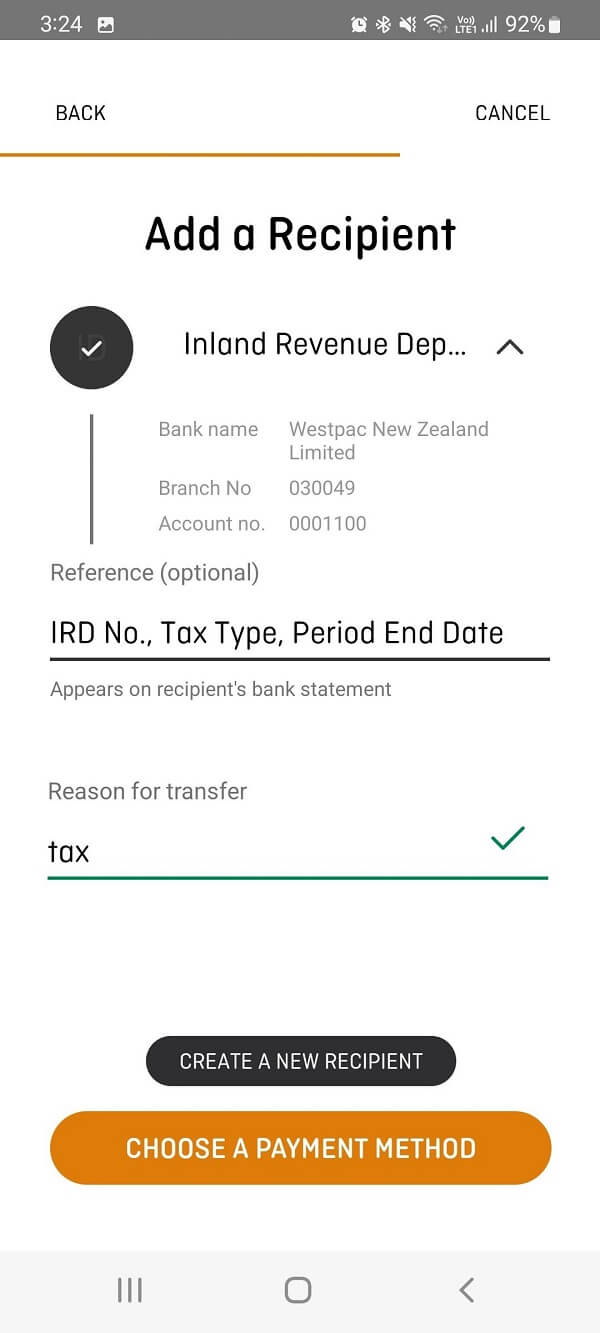
- Step 2. Add the IRD as a recipient: You will then be prompted to 'Add a recipient'. Enter the Inland Revenue Department details (as provided in an earlier section above).
- Step 3. Add IRD details: In the 'reference' section add your IR number, tax type and period end date (the box will appear once you have selected 'IR' as your recipient). Then enter your 'Reason for Transfer' and click 'Choose a payment method'.
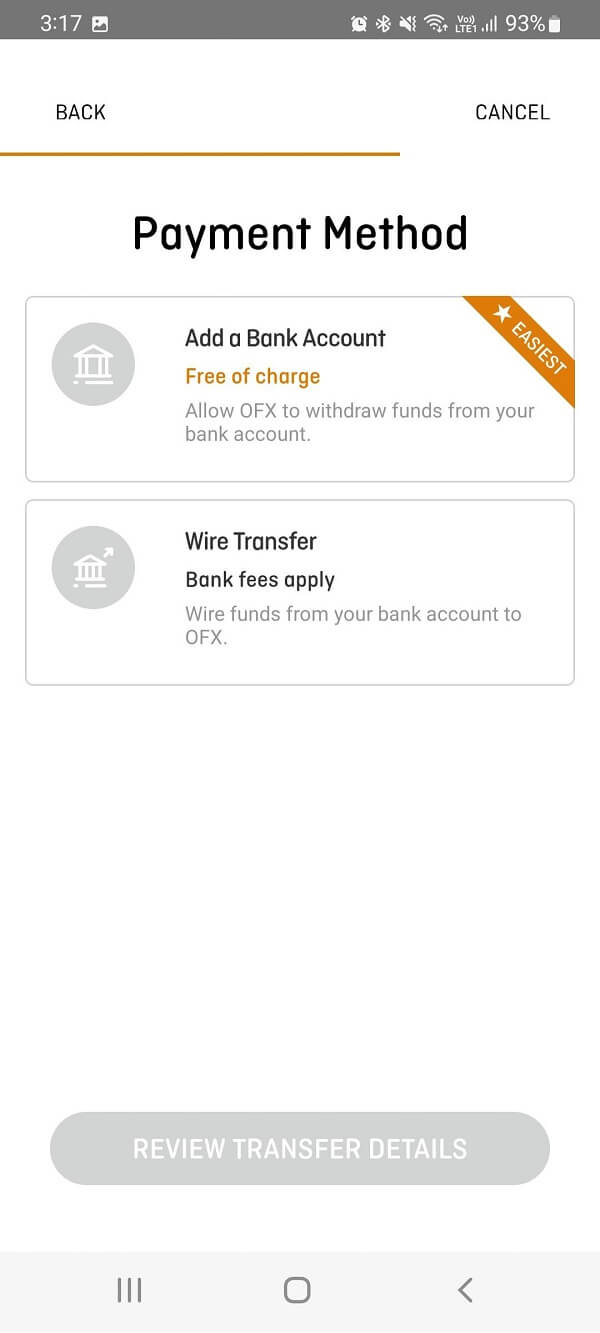
- Step 4. Select payment method: The currency you are transferring from will impact the page you see in the next step. An example of a USD payment has been shown below as an example. Once you have selected your payment method click 'Review Transfer Details'.
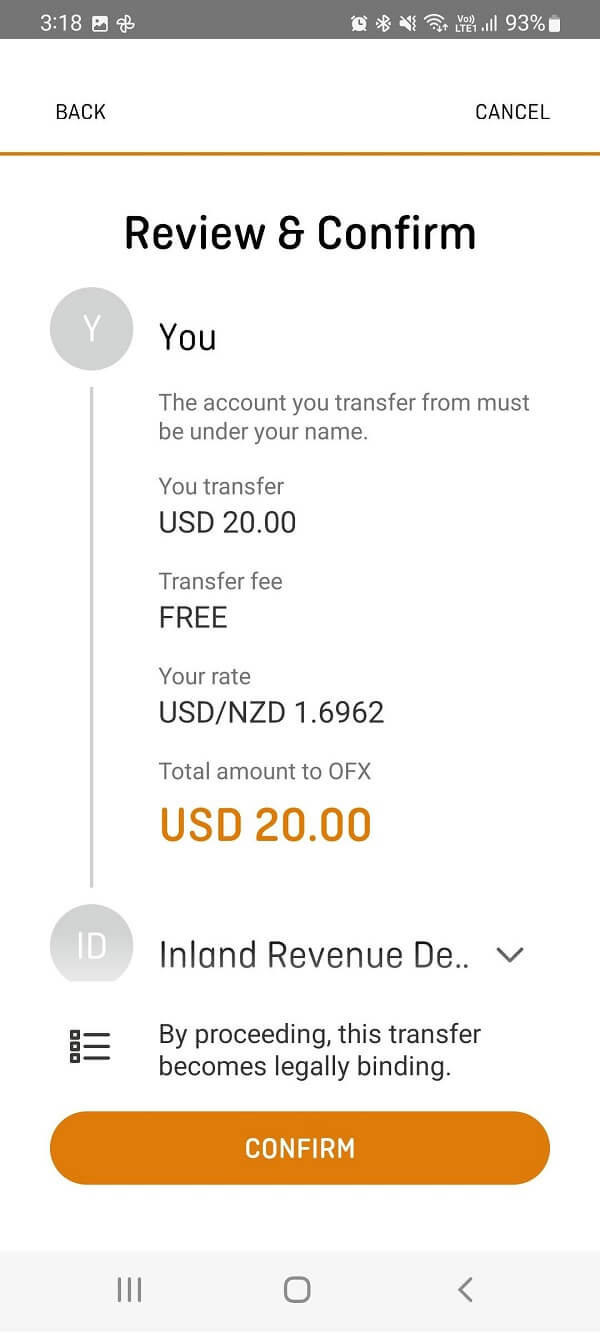
- Step 5. Review and confirm your transfer: Review your transfer summary to confirm all details are correct. If correct, click 'Confirm' to book your transfer.
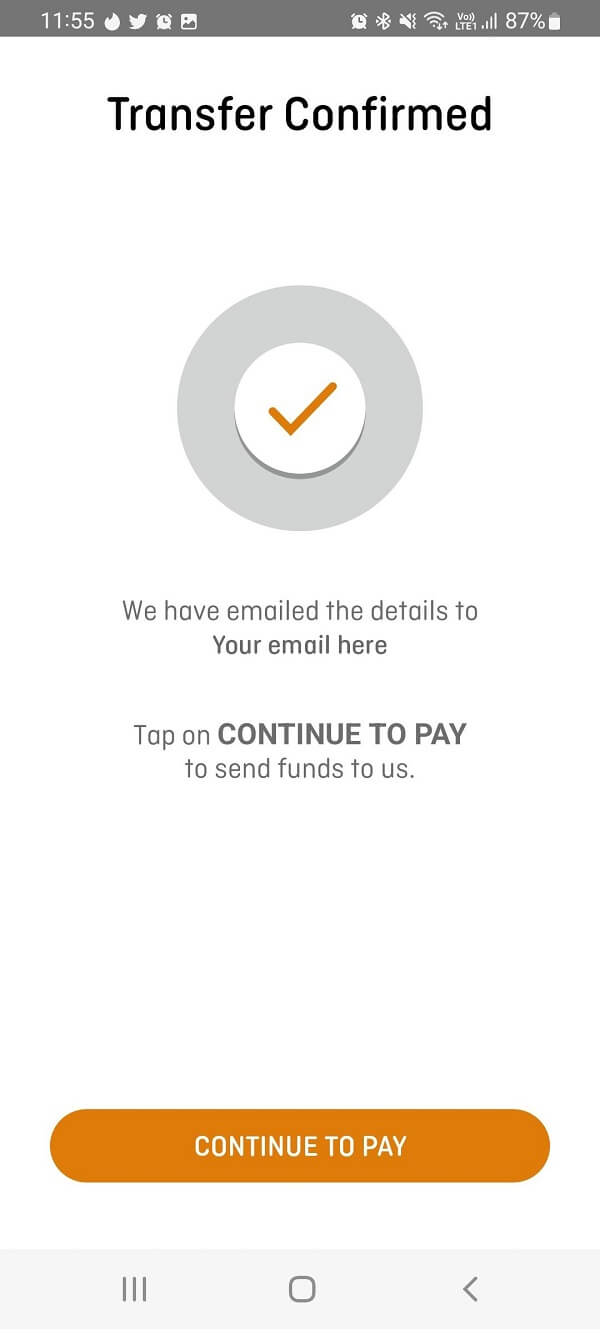
- Step 6. Fund your OFX IRD money transfer: OFX will then confirm that your transfer has been booked. You will receive a confirmation email from OFX which will include the relevant details for you to send your funds (this is based on the method of payment you selected in step 4).
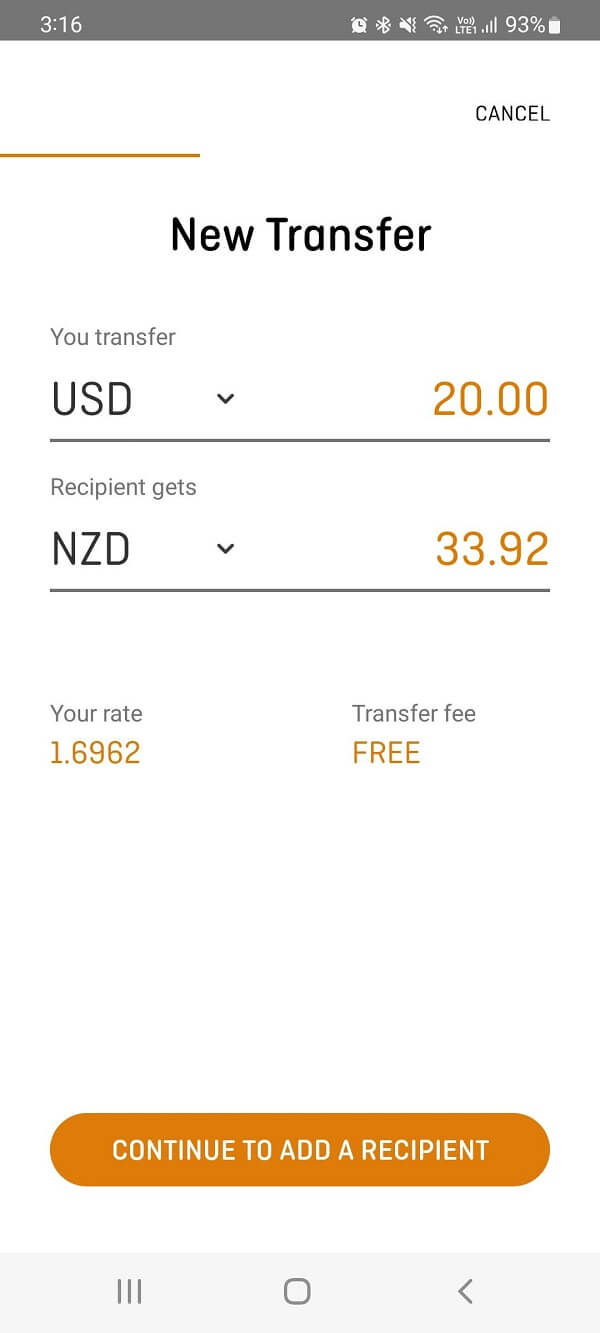
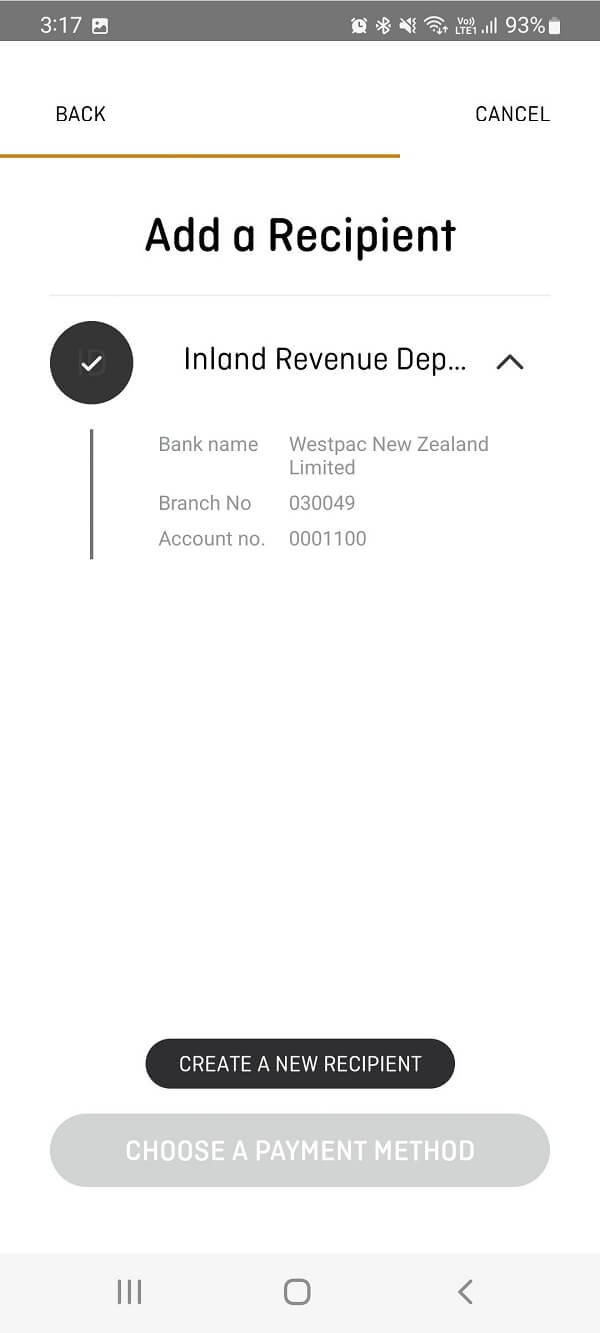
It is simple, quick and easy to make IRD tax payments with your OFX account.
This concludes all the steps you need to take to pay for your IRD tax obligations via OFX. Simply send OFX your funds, and they will do the rest.
How can I get help for making IRD tax payments via OFX?
Get in touch with your dedicated OFXpert, Bailey Stewart via bailey.stewart@ofx.com or 02 8667 8030.
More information about OFX
If you are new to OFX, check out our very detailed review about OFX. We cover their services in detail with a special focus on their international money transfer services.
Want to explore by country? Browse all destination countries on our send money to hub or sending countries on our send money from hub.
Check out all the information about OFX exchange rates, transfer fees, sending limits, available payment and delivery methods, and much more in our in-depth OFX review.
Conclusion
If you are an Australian or New Zealander settled overseas, making tax payments to the ATO in Australia or the IRD in New Zealand can be painful and cumbersome. With the OFX seamless integration with both the ATO and the IRD, you can pay your taxes quickly and easily.
In addition to the convenience and speed, you get access to OFX's competitive exchange rates, low fees and great customer service.
Take advantage of OFX's seamless integration with the ATO and the IRD now to take the hassle out of your Australia and New Zealand tax obligations.
Footnotes:
1. Your bank may charge a fee to send funds to OFX and on return of funds to you from OFX for transaction reversals or overpayments.
2. Time zones, public holidays and bank holidays may impact when the ATO will receive your payment. Transfers can take up to 4 business days from the time OFX receives your funds. You will be responsible for any penalty interest or other charge payable to the ATO as a result of late payments.
Categories


Similar Articles

Tax Treatment On Sale Of Property By NRI In India
Learn the tax implications for NRIs selling property in India. Understand key rules, deductions, and how to stay compliant with regulations.

Popular Mobile Wallets In Middle East And Africa
Explore popular mobile wallets in the Middle East and Africa and how they support financial inclusion and digital payments.

Popular Mobile Wallets In North America
Discover the most popular mobile wallets in North America and how they simplify payments, transfers, and everyday transactions.