
What is GCash and How Does it Work?
Table of Contents
- What is GCash?
- Why is GCash important?
- How do I create a GCash account?
- How do I create a GCash account using the GCash app?
- How do I create a GCash account by dialing *143#?
- How can I verify my GCash account?
- What are the differences between GCash Basic and Fully Verified accounts?
- What features do I get with a Basic GCash account?
- What features do I get with a Fully Verified GCash account?
- What is the process to verify my GCash Account?
- What are valid IDs accepted for GCash account verification?
- Is GCash secure?
- Can I trust GCash?
- How can I protect my GCash account?
- How can I report an unauthorized GCash transaction?
- Conclusion
If you have ever lived in the Philippines or know someone there, chances are that you have heard of GCash. If you send money to someone in the Philippines, or have done so in the past, you may have seen GCash listed as a delivery option to pay your recipient.
If you have wondered what is GCash, what are its advantages and how can it be used, you are in the right place. In a series of articles, we will present you with everything you need to know about GCash. In this post, we will focus on what is GCash and how it works.
What is GCash?
GCash is a mobile wallet that can be downloaded and installed on smartphones for Philippine residents. It allows users to do digital transactions, such as paying bills, transferring money, shopping, and investing, among many others.
With GCash downloaded and enabled on your smartphone, it is like carrying your money on your phone. You can take it long everywhere, and make all types of purchases without ever having to carry cash or share your bank account or credit card information with anyone. GCash is also a very secure platform (more on that later) so you are in safe hands – your hard earned money and private information is safe at all times within the GCash ecosystem.
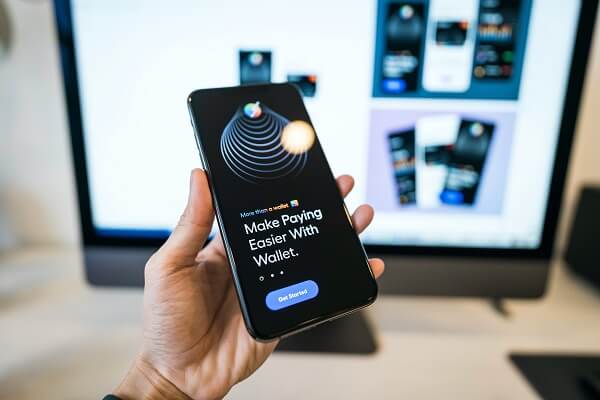
GCash is a mobile wallet that you can use to make all kinds of everyday transactions.
GCash was launched in 2004, and is owned and operated by Mynt (formerly Globe Fintech Innovations). Mynt is a joint venture of the following companies:
- Ant Group – operator of Alipay and an affiliate of the Alibaba group
- Ayala Group – a large Philippines based group of business
- Globe Telecom – a large telecom company based in the Philippines
In November 2021, Mynt announced that GCash had raised USD 300 million at a valuation of USD 2 billion. This effectively made Mynt a double unicorn based in the Philippines.
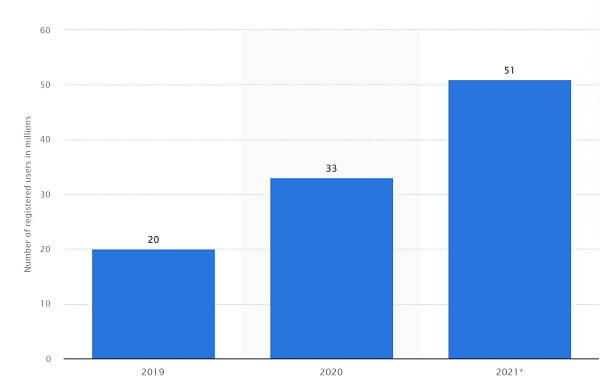
As of the end of October 2021, there were around 51 million registered GCash users across the Philippines, a 55% increase from the 33 million registered users in 2020. In 2021, GCash facilitated more than PHP 3 trillion in gross transactions, and had 23 million daily logins in the year.
The below graph shows GCash registered user growth from 2019 to 2021.
Continuing on its strong journey, as of May 2022, GCash has 55 million registered users and 4.5 million partner merchants on its network.
GCash has seen tremendous growth and adoption in the Philippines.
Which countries does GCash work in?
GCash is based out of the Philippines and a lot of the GCash services that you can use are provided by merchants, partners and utilities based out of the Philippines. For example, you can purchase life insurance products from companies offering insurance within the Philippines. Similarly, you can pay bills for Philippines based public utilities.
In that sense, GCash is primarily targeted at the Philippines market.
That said, you can apply for a GCash MasterCard which can be used anywhere in the world wherever MasterCard is accepted. And that is a huge global network spanning about 35.9 million participating MasterCard merchants in 210 countries and 150 currencies. This allows for overseas usage of your GCash digital wallet.
Most GCash provided services work in the Philippines. You can also use GCash MasterCard overseas at participating merchants.
Can GCash be used overseas?
You can use open a GCash account from overseas as long as you have a Philippines mobile phone number with any mobile network within the country. Additionally, if you wish you fully verify your GCash account, you must be a Philippines national with a valid address within the Philippines.
If you wish you use your GCash mobile wallet to make purchases abroad, you can apply for a GCash MasterCard and freely use it internationally wherever MasterCard is accepted. Note that you will need a fully verified GCash account to get a GCash MasterCard.
You need a Philippines mobile number to open a GCash account. Plus, only Filipino nationals with a Philippines address can fully verify their account.
In case you are trying to send money from overseas back to the Philippines, and prefer receiving funds in your or your recipient's GCash account, there are many options available. Check out our detailed money transfer comparison pages for your country combination to see options to send money to GCash from overseas.
Why is GCash important?
GCash allows users in the Philippines to make purchases online, load up their GCash account, and pay bills with just a few clicks. This makes doing many kinds of financial transactions convenient, easy and quick. You essentially have your money in your phone, and it is much easier to take it with you wherever you go, and to pay for everything without carrying cash or sharing your bank or card information. And if you wanted to, you could also withdraw your GCash funds as cash.
How is GCash helping Philippines residents financially?
GCash has made money transfers within the Philippines convenient for most Filipino users. Using GCash saves customers from lining up at banks and other financial institutions to make financial transactions. All they need is a smartphone, the GCash app, an internet connection, and they are good to go.
The GCash ecosystem also provides a variety of useful financial products and services. For example, GCash customers can use it to get quick loans through the GCredit feature. The amount of money they can borrow depends on their GScore, which is a credit rating system maintained within the GCash platform.
The GCash ecosystem lets you use many financial products and services with your GCash account.
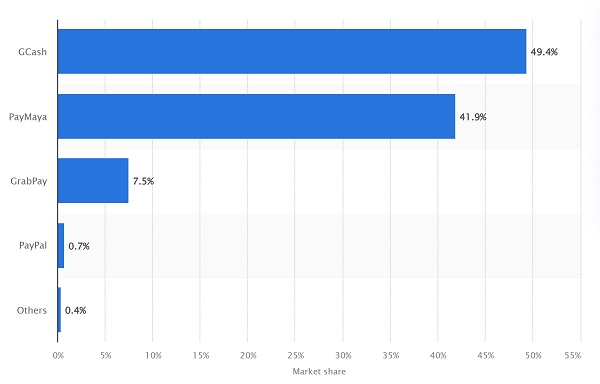
It is, therefore, no surprise that GCash has tremendous adoption in the Philippines. GCash is, in fact, the most popular digital mobile wallet in the Philippines with about 50% market share as of 2020. The below graph demonstrates this data point.
In the rest of this article, we will discuss how to create a GCash account, the differences between a normal and fully verified account and why you should ideally verify your GCash account, as well as how GCash ensures the security and safety of your money and information.
Let us dive in!
How do I create a GCash account?
There are 2 easy ways in which you can create a GCash account and unlock the power of your mobile phone as a digital wallet to send and receive money, pay bills online, shop and much more.
You can create your GCash account in one of the 2 ways below:
- Using the GCash app
- Dialing *143#
How do I create a GCash account using the GCash app?
Follow the steps below to create your GCash account via the GCash mobile app on either Android or iOS mobile devices:
- Step 1 - Download the GCash app on your mobile device.
- Step 2 - Open the app and put your mobile number. Click "Next".
- Step 3 - Check the message on your phone to get the 6-digit authentication code. If you did not receive it, click "Resend Now".
- Step 4 - After verifying your number, provide your personal details. Review them and click "Submit" if all information is correct.
- Step 5 - If applicable, indicate the referral code so that you and the person who referred you receive PHP 50 for the registration.
- Step 6 - Make a 4-digit Mobile Personal Identification Number (MPIN) or mobile pin.
- Step 7 - Review the terms and conditions of the platform and click "Submit".
- Step 8 - Click "Proceed to Login" then you can now start using the new account.
How do I create a GCash account by dialing *143#?
Another convenient way to create a GCash account is by dialing *143# from your mobile phone. Follow the simple steps below to create your GCash account using this method:
- Step 1 - Dial *143# from your mobile phone.
- Step 2 - When presented with the options, choose GCash and click Send.
- Step 3 - Now choose the option for Register, and click Send.
- Step 4 - Choose a Mobile Personal Identification Number (MPIN) and enter it twice to verify it.
- Step 5 - Provide all the necessary information needed to create your account.
- Step 6 - When prompted to pick an option, choose Register.
- Step 7 - Click Ok on the confirmation screen.
- Step 8 - You are all set now; simply download the GCash app from the app store and install it.
Creating a GCash account is quick and easy.
How can I verify my GCash account?
GCash accounts can be Basic or Fully Verified. If you verify your GCash account, you gain access to higher limits and a lot more features as compared to the Basic account.
Let us first see what different features you get with a Basic or Fully Verified GCash account.
What are the differences between GCash Basic and Fully Verified accounts?
You get a lot of additional features if you verify your GCash account. Before we look into those, let us first see what features are part of a GCash Basic account.
What features do I get with a Basic GCash account?
With a Basic GCash account, you get the below features out of the box:
- Access to 5 GCash features that include Offline Cash-in, Pay Bills, Buy Load, AMEX Virtual Pay and Pay QR
- Wallet amount limit of PHP 50,000
- Monthly incoming transaction amount limit of PHP 10,000
- Monthly outgoing transaction amount limit of PHP 10,000
- Refund of up to PHP 2,000 in case of fraudulent or unauthorized transactions as part of the GCash Customer Protect program
What features do I get with a Fully Verified GCash account?
With a Fully Verified GCash account, you get additional features over the Basic account that include the below:
- Access to all GCash features that include the 5 features included in the Basic account (Offline Cash-in, Pay Bills, Buy Load, AMEX Virtual Pay and Pay QR) as well as GCash Mastercard, Send Money, Cash Out, Request Money, Card Transactions, Invest Money, GCredit, Online Cash-in and International Remittance
- Wallet amount limit of PHP 100,000
- Monthly incoming transaction amount limit of PHP 100,000
- Monthly outgoing transaction amount limit of PHP 100,000
- Refund of up to PHP 100,000 in case of fraudulent or unauthorized transactions as part of the GCash Customer Protect program
The below table summarizes the key differences between a GCash Basic and Fully Verified account.
| GCash Feature/Functionality | GCash Basic Account | GCash Fully Verified Account |
|---|---|---|
| Wallet amount limit | PHP 50,000 | PHP 100,000 |
| Monthly incoming transaction amount limit | PHP 10,000 | PHP 100,000 |
| Monthly outgoing transaction amount limit | PHP 10,000 | PHP 100,000 |
| GCash features available | Offline Cash-in, Pay Bills, Buy Load, AMEX Virtual Pay and Pay QR | 5 Basic Account features plus GCash Mastercard, Send Money, Cash Out, Request Money, Card Transactions, Invest Money, GCredit, Online Cash-in and International Remittance |
| Refund limit as part of GCash Customer Protect program | Up to PHP 2,000 | Up to PHP 100,000 |
You get access to many additional features with a Fully Verified GCash account.
Additionally, verified GCash accounts are even more secure as the system ensures that only you are operating your account, and not a hacker or fraudster.
Clearly, there are many advantages to verify your GCash account. If you can, we recommend you verify your GCash account to tap into increased limits and access more features.
What is the process to verify my GCash Account?
If you have a GCash Basic account, you can follow the below simple steps to verify your account:
- Step 1 - Log in to your account through the app.
- Step 2 - Click the menu bar found in the upper left corner and click "Verify Now".
- Step 3 - Click "Get Fully Verified" and then, "Next".
- Step 4 - Prepare your valid ID and click "Next", and take a photo of your ID.
- Step 5 - After taking a photo of your ID, click "Next". Then take a photo of yourself (a selfie), making sure your room is well-lit so the selfie is clear.
- Step 6 - Provide the needed details and make sure all of them are correct.
- Step 7 - Agree to the terms and conditions by ticking the box and clicking "Confirm".
- Step 8 - Wait for 30 minutes for your application to be reviewed. You might be required to provide additional documents to complete your verification.
The GCash system will then verify your identity and validate your submitted documentation. If all validations pass, your account will be elevated to a verified status, and you will be able to enjoy full GCash features.
What are valid IDs accepted for GCash account verification?
GCash accepts a lot of IDs to help you get your account verified; these are listed below.
- Philippine Postal ID
- National ID or Philsys ID
- Passport
- Unified Multi-Purpose ID (UMID)
- PhilHealth Card
- Tax Identification Number (TIN) ID (with secondary documents)
- Home Development Mutual Fund (HDMF) ID
- Persons With Disability (PWD) ID
- Armed Forces of the Philippines (AFP) ID
- Voter's ID
- National Bureau of Investigation (NBI) ID
- Senior Citizen ID
- Professional Regulation Commission (PRC) ID
- Driver's License
- Student ID (for 18-21 years old only)
- Social Security System (SSS) ID
- Overseas Filipino Worker (OFW) ID
You can use a variety of IDs in the Philippines when verifying your GCash account.
Is GCash secure?
Making financial transactions through GCash is generally safe and secure. That is because the platform has many security features that include the below:
- Various authentication mechanisms like Mobile Personal Identification Number (MPIN), One-time Password (OTP), Facial Recognition and Fingerprint Login. A combination of these security features adds additional layers of security that make it harder for fraudsters to take hold of your account.
- Advanced Risk Management that enables GCash security and IT teams to constantly analyze transactions happening on the platform, and detect and prevent suspicious activities that may lead to fraud.
- Fund Insurance whereby GCash guarantees that they will investigate any unauthorized or fraudulent transactions posted to your account. Once such transactions are proven to be fraudulent, GCash will compensate you for any losses incurred.
- Prioritized Handling of all reports of fraudulent activity or unauthorized transactions enables the GCash team to respond to customer reports of suspicious activity within 24 hours. In this regard, GCash security team's response is faster than other financial institutions.
- Customer Protect Program that guarantees a 100% refund for unauthorized transactions posted to your account. As part of this program, GCash Basic Account users can get a refund of up to PHP 2,000 while GCash Fully Verified Account users are eligible for up to PHP 100,000 refund for unauthorized transactions that happen on their account.
GCash has plenty of safeguards in place to protect your money and information.
Can I trust GCash?
As a financial institution that handles money and does payment processing, GCash is regulated by the Bangko Sentral ng Pilipinas (BSP). GCash is a BSP-licensed e-money issuer and remittance agent, which means they pass all strict security checks and compliance guidelines enforced by the BSP. Conformance with such security guidelines and legal and regulatory standards is a requirement to obtain a BSP license. You can, thus, rest assured that GCash meets all security and safety standards.
GCash is regulated and licensed by the Bangko Sentral ng Pilipinas (BSP).
This is an additional reason why GCash verifies your identity and information as BSP requires they to do. Verification helps protect your account and information, and protection against fraud and other types of financial criminal activities.
How can I protect my GCash account?
GCash may implement the world's best security mechanisms, but another critical aspect of keeping your account safe is you. You play a very important part in ensuring that your GCash account is safe and secure at all times. Below are some security best practices to keep your account safe.
- Since your MPIN is your password to your GCash account, make sure it is safe at all times. It is highly recommended that you change your MPIN regularly.
- Set up your Account Recovery by configuring your Security Questions. This will help you reset your MPIN by yourself in case you forget it. Otherwise, you will have to contact GCash customer support team to regain access to your account.
- Set up your One Time Password (OTP) as well. OTP add one more layer of security to access your account and makes it harder for a nefarious individual to use your account.
- Never share your MPIN and OTP with anyone. If you do, you are basically granting access and authorizing a transaction. GCash customer support representatives will never ask for your MPIN and OTP.
- Regularly review your GCash transactions for accuracy and in case you see an unauthorized entry, report it to GCash immediately.
Follow security best practices to protect your GCash account at all times.
How can I report an unauthorized GCash transaction?
If you notice a transaction in your account that you did not authorize or make, it is possible that you may have become a victim of fraud, or your account may have gotten compromised.
The first step in getting your money back is to immediately report such unauthorized activity to GCash customer support team immediately. Note that you must file a report within 15 days of the unauthorized transaction.
Follow the below steps to report GCash transactions that you did not authorize:
- Step 1 - Reach out to GCash team via the Help Center from the website or the app, or connect with them via 2882.
- Step 2 - Fill your personal details in the ticket form.
- Step 3 - In the Concerns category, choose "My GCash Account", and "I want to report an unauthorized transaction".
- Step 4 - Complete the transaction dispute form, and get the following documents ready: For Mastercard, provide the last 4 digits of the card which you are reporting for, and for GCash app transactions, provide copy of valid ID and 3 specimen signatures.
- Step 5 - Submit the report.
From this point on, the GCash team will look into your report and proceed accordingly.
Conclusion
As a popular mobile wallet ecosystem, GCash has been gaining a lot of traction and adoption by customers. It is a great way to manage your day to day expenses in the Philippines as you can do so much with GCash – paying bills, making purchases, sending money to others, and much more.
Take advantage of this powerful platform to enjoy ease of use to manage your expenses on an ongoing basis.
This concludes our introduction on GCash and its inner workings. We will be publishing a series of additional articles that will deep dive into how to add and withdraw funds, and what all you can do with GCash.
Do You Need To Find the Best Remit Exchange Rate for Sending Money Internationally?
RemitFinder is an online service that helps you track remit exchange rates. By checking and comparing the latest remit exchange rates, you can get the best exchange rate for your money transfers. RemitFinder, thus, helps you to get the best return for your hard-earned money.
Find the cheapest rate to transfer your hard-earned money - visit our site or download the app on Google Play or Apple App Store now.
Want to explore by country? Browse all destination countries on our send money to hub or sending countries on our send money from hub.
Categories


Similar Articles

Tax Treatment On Sale Of Property By NRI In India
Learn the tax implications for NRIs selling property in India. Understand key rules, deductions, and how to stay compliant with regulations.
Popular Mobile Wallets In Middle East And Africa
Explore popular mobile wallets in the Middle East and Africa and how they support financial inclusion and digital payments.

Popular Mobile Wallets In North America
Discover the most popular mobile wallets in North America and how they simplify payments, transfers, and everyday transactions.