
What Is PayNow And How Does It Work?
Table of Contents
- What Is PayNow?
- How Does PayNow Work?
- How To Setup PayNow?
- How to setup PayNow with DBS Bank?
- How to setup PayNow with DBS Bank using digibank online banking?
- How to setup PayNow with DBS Bank using digibank mobile app?
- How to setup PayNow with DBS Bank using SMS?
- How to setup PayNow with OCBC Bank?
- How to setup PayNow with OCBC Bank using OCBC Online Banking?
- How to setup PayNow with OCBC Bank using OCBC Digital app?
- How to setup PayNow with OCBC Bank using SMS?
- How to setup PayNow with UOB Bank?
- How to setup PayNow with UOB Bank using the UOB TMRW app?
- How to setup PayNow with UOB Bank using SMS?
- How to setup PayNow with POSB Bank?
- How to setup PayNow with other Singapore banks?
- What Types Of PayNow Payments Can I Make?
- Which Singapore Banks Support PayNow?
- How Can I Use PayNow For Purchases And Payments?
- Purchases via PayNow QR Code
- Receiving money via PayNow
- Sending money via PayNow
- Paying businesses using PayNow Corporate
- Receiving payments or refunds from businesses
- Payments via VPA
- What Are The Benefits Of PayNow?
- Is PayNow Safe?
- Are There Any Limitations To PayNow?
- Frequently Asked Questions About PayNow
- What is the difference between PayLah and PayNow?
- What is PayNow transfer limit?
- How to increase PayNow limit?
- How to generate PayNow QR Code?
- Our Concluding Thoughts On PayNow
In recent years, there has been a significant shift towards digital payments, with more and more people making transactions using online payment systems.
One such digital payment system is PayNow, which is gaining popularity in Singapore as a fast, convenient and secure way to make payments and transfer money. PayNow is a peer-to-peer funds transfer service enabling individuals to transfer money instantly using their mobile number or National Registration Identity Card (NRIC).
PayNow recently teamed up with UPI as well to amplify the reach of seamless digital payments between individuals as well as businesses in India and Singapore.
This article will explore what PayNow is, how it works, and its benefits and limitations. We will also discuss the security and privacy features of PayNow and how to set it up and use it for transactions.

What Is PayNow?
PayNow is a digital payment system that launched in Singapore in 2017. It is an instant funds transfer service that enables individuals to transfer money to each other using just their mobile number or National Registration Identity Card (NRIC).
PayNow is available to customers of several participating banks in Singapore that include all major Singapore banks like Citibank, DBS Bank/POSB, HSBC, Maybank, OCBC Bank, Standard Chartered Bank, and United Overseas Bank.
One of the key features of PayNow is that it is integrated with the Singaporean national identification system, which makes it easy for users to transfer money without needing to exchange bank account details. Instead, users can simply link their mobile number or NRIC or FIN (Foreign Identification Number) to their bank account and use it to make payments.
Additionally, PayNow allows businesses to receive payments using their Unique Entity Number (UEN), simplifying the payment process for both companies and customers.
PayNow is a digital payment service in Singapore that makes it easy to send and receive money via easy links to a mobile number or National Registration Identity Card (NRIC) or Foreign Identification Number (FIN) or Unique Entity Number (UEN) for businesses.
Who owns and operates PayNow?
PayNow was developed by the Association of Banks in Singapore (ABS) and continues to be owned and operated by them.
ABS is a non-profit organization that oversees various affairs of the banking and financial ecosystem in Singapore. As of 2021, ABS has more than 150 local and foreign Singapore banks and financial institutions as its members.
Almost all of Singapore's major banks are ABS members; this also helps more adoption of PayNow.
How Does PayNow Work?
One of the biggest advantages of PayNow is that it is available 24/7 and does not require any additional fees. This makes it a convenient and cost-effective way to send and receive money in Singapore.
But first let's understand how PayNow works. The below step-by-step guide lays out the execution steps that you will need to undertake to make a successful PayNow transaction:
- Step 1: Register For PayNow. To use PayNow, you need to link your mobile number or NRIC to your bank account. Most banks in Singapore offer PayNow services, so make sure to check with your bank if they support PayNow.
- Step 2: Link Your Bank Account To PayNow. Once you have registered for PayNow, you need to link your bank account to your mobile number or NRIC/FIN or UEN in case you represent a business. This is a one-time setup process; you only need to do it once.
- Step 3: Send Money via PayNow. To send money using PayNow, you need to enter the recipient's mobile number or NRIC/FIN or UEN, and the amount you wish to transfer. You can do this through your bank's mobile app or internet banking portal. Once you confirm the details, the money is transferred instantly to the recipient's bank account.
- Step 4: Receive Money. To receive money using PayNow, give the sender your mobile number or NRIC/FIN or UEN. The sender can then transfer the money to your bank account using PayNow. You will receive a notification once the money has been transferred.
- Step 5: Check Transaction History. You can check your PayNow transaction history through your bank's mobile app or internet banking portal. This allows you to keep track of all your PayNow transactions.
PayNow is a fast and convenient way to send and receive instant payments in Singapore. Both individuals as well as businesses can take advantage of PayNow to send and receive money.
How To Setup PayNow?
Setting up PayNow is quick and easy, and it can be done through your bank's mobile banking app or online banking platform.
Even though the exact steps may vary from bank to bank, here are the general steps to set up PayNow that should work for most banks in Singapore:
- Step 1: Log in to your bank's mobile banking app or online banking platform.
- Step 2: Look for the PayNow option and select "Register".
- Step 3: Choose whether you want to register using your mobile number or NRIC/FIN or UEN number.
- Step 4: Enter the required details, such as your name, mobile number or NRIC/FIN or UEN number, and email address.
- Step 5: Verify your details by following the instructions provided by your bank. This may involve receiving a One-Time Password (OTP) or answering security questions.
- Step 6: Once your details have been verified, you will receive a confirmation message that your PayNow account has been set up.
In summary, to use PayNow to make payments, you must link your bank account to your mobile number or NRIC/FIN or UEN number. You can do this by selecting the "Link Account" option in your bank's PayNow menu and following the instructions provided.
It is quick and easy to setup PayNow by linking it with your bank account. You can link PayNow with your NRIC/FIN, UEN or mobile number. Setup once and start making and receiving seamless payments.
Once your account is linked, you can use PayNow to make and receive payments instantly without needing cash or physical cards. Simply enter the recipient's mobile or NRIC/FIN or UEN number, the payment amount, and confirm the transaction. The funds will be transferred instantly from your bank account to the recipient's account.
Next, we will cover PayNow setup steps for a few popular Singapore banks.
How to setup PayNow with DBS Bank?
You can setup PayNow with DBS Bank1 using either the DBS Bank digibank online banking experience or via the digibank mobile app or via SMS. Below are the steps for each.
How to setup PayNow with DBS Bank using digibank online banking?
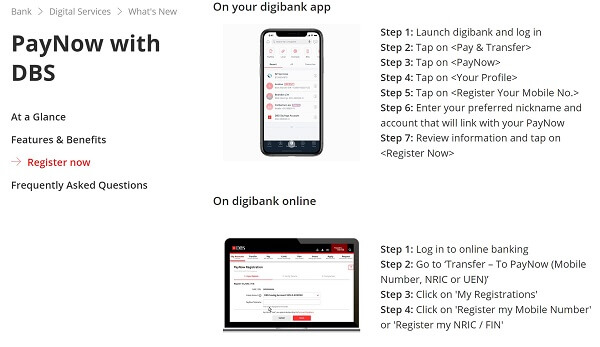
Follow the below steps to link your DBS Bank account with PayNow using digibank online banking experience:
- Step 1: Log in into your digibank online banking portal using your username and password.
- Step 2: Navigate to the option "Transfer - To PayNow (Mobile Number, NRIC/FIN or UEN)" to start the linking process.
- Step 3: Next, click on the "My Registrations" option.
- Step 4: Now choose the option called "Register my Mobile Number" or "Register my NRIC/FIN" and follow the steps to complete the process.
How to setup PayNow with DBS Bank using digibank mobile app?
Follow the below steps to link your DBS Bank account with PayNow using digibank mobile app:
- Step 1: On your mobile phone, launch the digibank mobile app and log in into your account.
- Step 2: Navigate menu options as follows: "Pay & Transfer" > "PayNow" > "Your Profile" > "Register Your Mobile No".
- Step 3: Next, choose the account you wish to link with PayNow, and enter your chosen PayNow nickname.
- Step 4: Check that all the information is correct and click on "Register Now" to finish the linking process.
How to setup PayNow with DBS Bank using SMS?
Follow the below steps to link your DBS Bank account with PayNow using SMS:
- To register your NRIC/FIN with PayNow: SMS the following message to 77767 - PayNow<space>register<space>NRIC<space>last 4 digits of bank account <space>chosen nickname. For example - PayNow register nric 2360 Joshua
- To register your mobile number with PayNow: SMS the following message to 77767 - PayNow<space>register<space>mobile<space>last 4 digits of bank account <space>chosen nickname. For example - PayNow register mobile 2360 Joshua
As you can see, it is quick and easy to link your DBS account with PayNow.
How to setup PayNow with OCBC Bank?
Similar to DBS Bank, you can also setup PayNow with OCBC Bank2 using either OCBC Online Banking or OCBC Digital app or SMS. Below are step-by-step instructions for each method.
How to setup PayNow with OCBC Bank using OCBC Online Banking?
Follow the below steps to link your OCBC Bank account with PayNow using OCBC Online banking facility:
- Step 1: Log in into your OCBC Online banking portal and navigate to the main menu and click on "Customer Service", and then "Link or Manager PayNow". Note that you will need to enter your OTP to authenticate yourself.
- Step 2: Now select which mechanism you want to use to link to PayNow - options include NRIC or FIN number and mobile number.
- Step 3: Next, select your OCBC bank account that you want to link with PayNow. Also, choose your PayNow name. Note that you will also need to agree to the terms and conditions for using PayNow. Once you have read the terms and agreed to them, click on Submit.
- Step 4: You will receive an OTP to authenticate the linking of your OCBC account and PayNow on your mobile. Enter the OTP on the pop up screen and click Submit.
If all goes well, your OCBC bank account will be linked with PayNow successfully.
How to setup PayNow with OCBC Bank using OCBC Digital app?
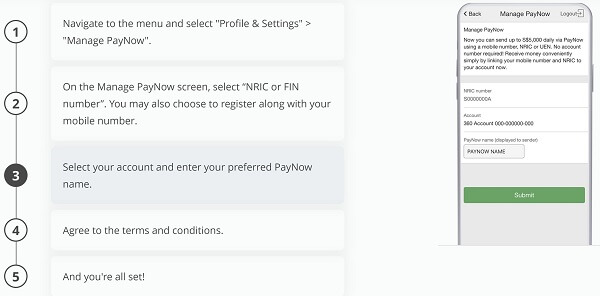
Follow the below steps to link your OCBC Bank account with PayNow using your OCBC Digital mobile app:
- Step 1: Launch the OCBC Digital app on your phone, login into your account and navigate to "Profile & Settings" > "Manage PayNow" menu option.
- Step 2: On the Manager PayNow screen choose whether you want to link your OCBC bank account with your NRIC/FIN or mobile number.
- Step 3: Choose which of your OCBC bank accounts you want to link with PayNow and enter your PayNow name.
- Step 4: You will need to agree to the term and conditions of using PayNow. Review these carefully and if you agree, click on the Agree button at the bottom.
This is it; in just a few simple steps, you have successfully setup PayNow on your OCBC bank account.
How to setup PayNow with OCBC Bank using SMS?
If you wish to connect PayNow with your OCBC bank account using SMS, follow the instructions below:
- To link your OCBC account with your NRIC: SMS the following message to 72323 - REGN<space>NRIC<space>last 6 digits of bank account. For example - REGN NRIC 348960
- To link your OCBC account with your mobile number: SMS the following message to 72323 - REGM<space>mobile<space>last 6 digits of bank account. For example - REGM your-mobile-number 348960
Whichever method you follow to setup PayNow on your OCBC account, it is quick and easy and takes only a couple of minutes to connect your OCBC bank account with PayNow.
How to setup PayNow with UOB Bank?
To be able to setup PayNow with UOB Bank, you have 2 options - use the UOB TMRW mobile app or use SMS. Let's look at both options below.
How to setup PayNow with UOB Bank using the UOB TMRW app?
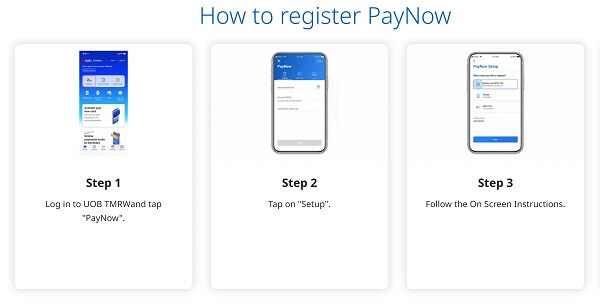
If you have a UOB bank account, you can easily setup PayNow3 on your account using the UOB TMRW mobile app. Below are the steps to link your UOB bank account with PayNow:
- Step 1: On your mobile, open the UOB TMRW mobile app and login into your account. Click on the "PayNow" menu option.
- Step 2: Click on Setup option.
- Step 3: In this step, choose how you want to connect with PayNow - using your NRIC/FIN or your mobile number. Click Next to proceed.
- Step 4: Now choose which UOB bank account you want to link with PayNow.
- Step 5: Review all the information and ensure everything looks OK. Swipe to the right to confirm.
- Step 6: You will receive an OTP via an SMS sent to your mobile phone; enter the same and confirm.
- Step 7: Registration is complete and your UPB bank account is now setup to send and receive PayNow payments.
As you can see, it is quick and easy to setup PayNow on your UOB bank account.
How to setup PayNow with UOB Bank using SMS?
Another easy way to setup PayNow on your UOB account is via SMS. If you wish to follow this method, simply follow the steps below:
- To link your UOB account with your NRIC: SMS the following message to 71423 - PAYNOW<space>NRIC<space>last 4 digits of bank account number<space>NRIC. For example - PAYNOW NRIC 7610 NRIC
- To link your UOB account with your mobile number: SMS the following message to 71423 - PAYNOW<space>NRIC<space>last 4 digits of bank account number<space>Mobile. For example - PAYNOW NRIC 7610 Mobile
How to setup PayNow with POSB Bank?
Since POSB Bank is owned by DBS Bank, the process to setup PayNow on your POSB bank account is very similar to that of DBS Bank. See our prior section on various ways you can link you DBS bank account to PayNow - use the same steps to link your POSB bank account to PayNow as well.
How to setup PayNow with other Singapore banks?
As you can see from the prior sections, the process to setup PayNow with a bank account is very similar. The good news is that it is quick and easy to connect setup PayNow with your bank account.
If in doubt, you can always reach out to your bank's customer service team to get help. But in general, if your bank supports PayNow, you should be able to enable it easily on your account.
What Types Of PayNow Payments Can I Make?
PayNow supports two payment schemes; these are as below:
- PayNow Fund Transfer: This is PayNow's payment method for individuals. PayNow Fund Transfer, also sometimes just referred to as PayNow, is designed for personal use and enables individuals to transfer funds to each other quickly and easily, without needing to exchange bank account information.
- PayNow Corporate: This is PayNow's payment method for businesses and corporations. PayNow Corporate is designed for business use and enables companies to receive payments from customers or make payments to suppliers using their unique entity numbers.
PayNow supports individual transfers as well as business payments via the PayNow Corporate service.
Which Singapore Banks Support PayNow?
Before you decide to setup PayNow on your bank account, you need to check if your bank supports PayNow or not. The Association of Banks in Singapore (ABS) maintains a list of all banks4 that allow setting up PayNow and PayNow Corporate.
PayNow for individuals
At this time, there are 10 banks and 4 Non-Bank Financial Institutions (NFIs) that support PayNow in Singapore. Below is the list of these Singapore banks and NFIs that allow linking your account with PayNow if you are an individual:
- Bank of China
- CIMB Bank Berhad
- Citibank Singapore Limited
- DBS Bank/POSB Bank
- HSBC
- Industrial and Commercial Bank of China Limited
- Maybank
- OCBC Bank
- Standard Chartered Bank
- UOB
- GrabPay
- LiquidPay
- Singtel Dash
- Xfers
PayNow Corporate for businesses
If you want to setup PayNow Corporate with your business bank account, there are 15 banks and 4 Non-Bank Financial Institutions (NFIs) in Singapore that support PayNow; these are listed below.
- ANZ
- Bank of China
- BNP Paribas
- CIMB Bank Berhad
- Citibank Singapore Limited
- DBS Bank/POSB Bank
- Deutsche Bank
- HSBC
- Industrial and Commercial Bank of China Limited
- P. Morgan
- Maybank
- OCBC Bank
- Standard Chartered Bank
- Sumitomo Mitsui Banking Corporation
- UOB
- GrabPay
- LiquidPay
- Singtel Dash
- Xfers
There are many banks and financial institutions that support PayNow as well as PayNow Corporate. If in doubt, check with your bank to see if they allow setting up PayNow on your account.
How Can I Use PayNow For Purchases And Payments?
There are a variety of ways you can use PayNow for spending and purchases as well as to send and receive money. For example, you can use PayNow for paying bills, making online purchases, and transferring money to family and friends.
Below we list various PayNow payment methods you can use.
Purchases via PayNow QR Code
For online or physical merchants that accept PayNow payments, you can simply scan the PayNow QR Code via your bank's mobile app. The app will ensure that the payment reaches the correct destination by parsing the PayNow QR Code of the merchant.
Sometimes your bank's mobile app may not generate the amount to pay after scanning the QR Code automatically. If that happens, simply enter the payment amount yourself and finish the transaction.
Receiving money via PayNow
Simply link your bank account to your mobile number or Singapore NRIC/FIN (for individuals) or UEN (for business entities), and create your PayNow name.
Note that the linking process is a one-time registration step only. Once PayNow is setup on your account, you are ready to receive money.
Once PayNow setup is complete, all your sender needs to know is your PayNow linked mobile number, NRIC/FIN or UEN number, and they will be able to send money directly into your account. No bank details or account information needs to be shared.
Sending money via PayNow
Sending money with PayNow is also super easy and convenient. Simply input the recipient's mobile number, NRIC/FIN or UEN number, enter the amount and send. The funds will get deposited directly into the receiver's bank account.
Paying businesses using PayNow Corporate
With the launch of PayNow Corporate, you can make payments to businesses as long as your know their PayNow name or UEN. This is a great way to make payments to businesses and entities without having to use checks or cards.
Receiving payments or refunds from businesses
PayNow and PayNow Corporate work bidirectionally - this means that not only can you pay a business using PayNow Corporate, but a business can also pay you via PayNow. This makes it easy to receive refunds for returns or other such payments from businesses.
Payments via VPA
You can also pay someone with PayNow using their Virtual Payment Address (VPA). The VPA is yet another proxy method that helps create link to e-wallets from Non-Bank Financial Institutions (NFIs). This is another convenience so you do not have to pay others who have such mobile wallets in Singapore through other means - simply ask for their VPA and pay with PayNow.
From direct money transfers to receiving payments from both individuals to business, and paying via QR Codes and VPAs, there are numerous easy way to send and receive money and payments using PayNow.
PayNow eliminates the need for cash or physical cards, making it a more convenient and secure payment option. Additionally, there is no need to ever share your bank account or related information - this decreases the risk of any potential fraud or unauthorized access.
What Are The Benefits Of PayNow?
PayNow is a digital payment system in Singapore that offers numerous benefits for individuals and businesses. Here are some of the key benefits of using PayNow:
- Convenience: PayNow allows for quick and easy transactions using a mobile or NRIC number. This eliminates the need for cash or physical cards, making it a more convenient payment option.
- Instant Transfers: PayNow enables instant fund transfers between bank accounts, which means you can receive or send money immediately without any delay.
- Secure: PayNow is a secure payment system that uses encryption technology to protect your personal and financial information. Additionally, you never need to share your bank account or other information with anyone.
- Low Fees: PayNow transactions typically have low or no fees, making it a cost-effective payment option.
- Widely Accepted: PayNow is available to customers of most major banks in Singapore, which means you can use it to make payments to anyone with a bank account.
- Easy To Set Up: Setting up a PayNow account is a quick and easy process that can be done through your bank's mobile banking app or online banking platform.
- Versatile: PayNow can be used for a variety of transactions, such as paying bills, making online purchases, and transferring money to family and friends.
PayNow is easy, secure, convenient and a widely adopted payment method popular in Singapore. And the best part - you never need to share your bank account information with anyone.
Overall, PayNow is a convenient, secure, and cost-effective payment option offering many benefits for Singapore's individuals and businesses. Its ease of use and instant transfers make it a popular payment option for many people. Plus, its wide acceptance ensures that you can use it to make payments to anyone with a bank account.
Is PayNow Safe?
Security and privacy are critical aspects of any digital payment system, and PayNow takes these concerns seriously. Here are some of the measures that PayNow has implemented to ensure the security and privacy of its users:
- Encryption: PayNow uses encryption to protect its users' personal and financial information. This ensures that sensitive information, such as bank account numbers and transaction details, is secure and cannot be accessed by unauthorized parties.
- Authentication: PayNow requires users to authenticate themselves before accessing their accounts or making transactions. This typically involves a two-factor authentication (2FA) process that requires a password and a one-time code sent via SMS or email.
- Fraud Detection: PayNow has implemented fraud detection systems that monitor transactions for any suspicious activity. This helps to prevent fraudulent transactions and protect users from financial losses.
- Privacy Policy: PayNow has a privacy policy that outlines how it collects, uses, and protects user data. This policy complies with the Personal Data Protection Act (PDPA) in Singapore, which sets out strict guidelines for collecting, using, and disclosing personal data.
- Regulatory Oversight: PayNow is regulated by the Monetary Authority of Singapore (MAS), which ensures that it complies with the relevant laws and regulations related to digital payments. This provides an additional layer of protection for users and helps maintain the payment system's integrity.
PayNow is a safe and secure system that implements many security protocols in an effort to protect your money and private information.
Are There Any Limitations To PayNow?
While PayNow is a convenient and popular payment system in Singapore, there are some limitations to its use. Here are some of the key limitations of PayNow:
- Bank Account Required: To use PayNow, you need to have a bank account with one of the participating banks in Singapore. This means that if you do not have a bank account with a banks that supports PayNow, you cannot use it.
- Limited Merchant Acceptance: While PayNow is widely accepted among individuals in Singapore, not all merchants accept PayNow as a payment method. This means that you may still need to use cash or other payment options for certain transactions.
- Limited International Use: PayNow is only available for domestic transactions in Singapore. If you need to make an international payment, you will need to use an alternative payment system.
- Possible Transaction Fees: While most PayNow transactions are free, some banks may charge a transaction fee for certain types of transactions, such as bill payments.
- Mobile Number or NRIC Needed: To use PayNow, you need to have a registered mobile number or NRIC number. This may be a limitation for individuals who do not have a mobile phone or NRIC.
There can be some hurdles to use PayNow - for example, if you do not own a mobile or do not have an NRIC/FIN. Most people will not face any issues in setting up and using PayNow.
Frequently Asked Questions About PayNow
Below are answers to some additional Frequently Asked Questions (FAQs) about PayNow.
What is the difference between PayLah and PayNow?
PayLah! is a popular mobile wallet in Singapore, and is owned and operated by DBS Bank, the country's largest bank. More than 2 million Singaporeans use PayLah! to make online purchases, and payments to businesses, friends and family.
PayNow, on the other hand, is Singapore's interbank money transfer and payment system which lets you send and receive payments via your mobile number, NRIC/FIN or UEN.
In this way, even though PayLah! and PayNow are very different from each other, both let you send money and make purchases.
The biggest difference between both is that PayNow is always tied to your bank account at any PayNow participating bank and backed by it, whereas PayLah! is owned and managed by DBS Bank and hence can be connected to your DBS bank account.
What is PayNow transfer limit?
PayNow transfer limit varies from bank to bank.
For example, the transfer limit for PayNow payments with DBS Bank is the same as the limit for your daily local interbank transfers. You can also change this limit yourself by using DBS online banking website.
OCBC Bank, on the other hand, imposes a daily PayNow transfer limit of SGD 200,000. UOB, on the other hand, lets you see and manager your PayNow limit within the UOB TMRW mobile app.
In summary, different banks have different limits for PayNow; check with your bank to see what the limits are for PayNow transfers and payments.
How to increase PayNow limit?
Most banks that support PayNow allow you to manage your transaction limits via their online banking portals or mobile apps. It is pretty easy to increase your PayNow limit as long as your bank allows you to do so.
For example, below are the steps to increase your PayNow limit with DBS Bank using the digibank mobile app:
- Step 1: Sign in into your digibank mobile app and click on More.
- Step 2: Look for the section called "Transfer Settings", and choose "Local Transfer Limit".
- Step 3: Then click on the option called "To Other Banks". Here you will see your current transaction limit; you can change this according to your needs.
The steps to increase your PayNow limit with OCBC, UOB and other banks are very similar. If in doubt, contact your bank to get instructions on how to change your PayNow limit.
How to generate PayNow QR Code?
If you wish to pay using QR Code with PayNow, simply use your bank's mobile app to scan the QR Code of participating merchants, business and shops. The app will read the QR Code and should also populate the amount (input the amount yourself in case it does not get auto-populated).
That's it. Your bank will handle the PayNow payment and send the funds to the recipient's bank account.
Our Concluding Thoughts On PayNow
In summary, PayNow is a digital payment system that provides a convenient, secure, and cost-effective way to transfer money between bank accounts in Singapore. With its ease of use and instant transfers, PayNow has become a popular payment option for individuals and businesses alike.
PayNow's wide acceptance and versatility allow users to make payments to anyone with a bank account, whether for bills, online purchases, or sending money to family and friends.
While PayNow has some limitations, such as the requirement for a bank account, it remains a reliable and convenient payment option for many people in Singapore. With its commitment to security and privacy, PayNow continues to be a trusted and valuable tool for managing financial transactions in today's digital age.
Do You Need To Find the Best Remit Exchange Rate for Sending Money Internationally?
RemitFinder is an online service that helps you track remit exchange rates. By checking and comparing the latest remit exchange rates, you can get the best exchange rate for your money transfers. RemitFinder, thus, helps you to get the best return for your hard-earned money.
Find the cheapest rate to transfer your hard-earned money - visit our site or download the app on Google Play or Apple App Store now.
Want to explore by country? Browse all destination countries on our send money to hub or sending countries on our send money from hub.
References:
1. How to setup PayNow with DBS Bank
2. How to setup PayNow with OCBC Bank
3. How to setup PayNow with UOB Bank
4. Association of Banks in Singapore (ABS) fact sheet on PayNow
Categories


Similar Articles


CNAPS Codes Unraveled: Navigating China's Banking Landscape
Discover CNAPS Codes: China's unique bank identifier for fast, secure transactions. Learn how CNAPS Codes simplify payments across China's banking system.

ABA Routing Numbers In The US: A Comprehensive Guide
Discover what ABA Routing Numbers are, how they work and their importance in US banking transactions like direct deposits, online transactions and wire transfers.

What Is A NUBAN Number And What Is It Used For?
Learn what a NUBAN number is and how it helps identify bank accounts in Nigeria for secure and efficient transactions.